Your data becomes your advantage when it stays in one operating system
When all your company data lives in one owned operating system, the assistant gets sharper and the business gets better informed. Here is why.
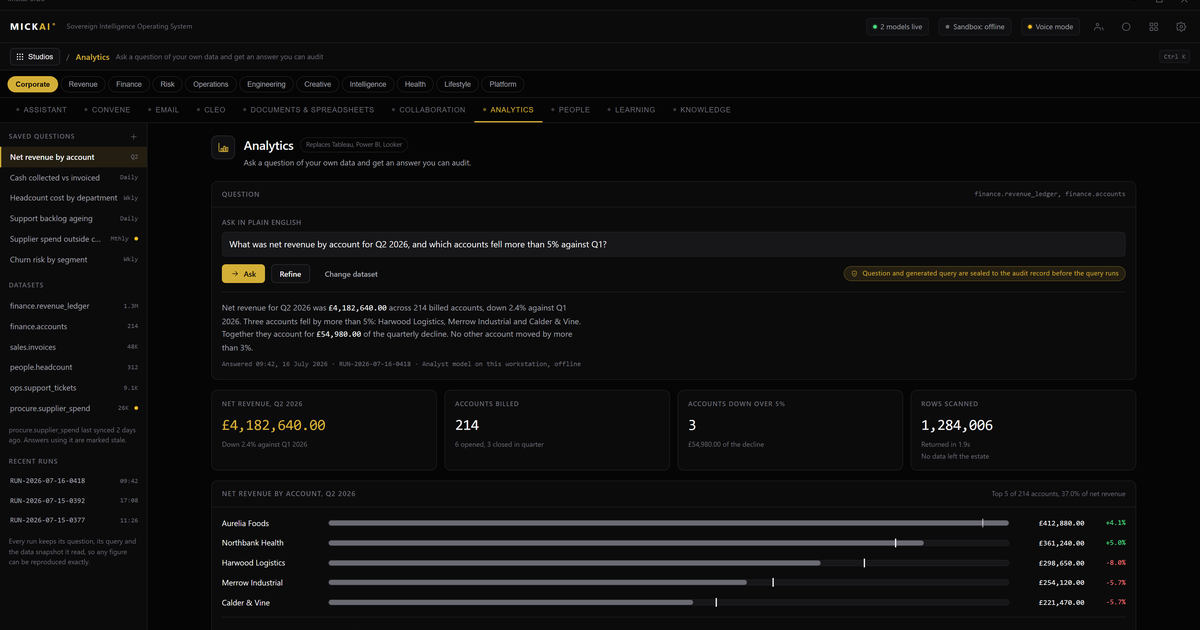
Your data is only an advantage when something can read all of it at once. Scatter it across Microsoft, Google, Slack, Salesforce and a dozen other vendor clouds and no single tool can see the whole picture, least of all the assistant you are paying to help you. Keep it in one operating system you own, and the assistant reads across everything with full context, while the recurring per-seat bills go away.
That is the case for owning your stack rather than renting it. Below is what a company actually gets, and how to work out what it saves.
The problem is not the tools, it is the walls between them
Most companies do not lack software. They have email in one cloud, files in another, chat in a third, meetings in a fourth, and customer records in a fifth. Each one is competent on its own. The trouble is the walls.
Your customer email thread lives with one vendor. The contract sits with another. The Slack conversation where the deal actually got decided lives with a third. The meeting where the client changed their mind lives with a fourth, if it was recorded at all. No single system can see across those walls, so no assistant can either. It answers from the fragment it happens to have access to, and you fill in the rest from memory.
Every connector you bolt on to bridge those walls is another contract, another set of permissions, another place your data is copied to. The walls do not come down. They just get more doors.
One operating system, studios on top, your data underneath
We take a different shape. Everything runs on one sovereign operating system, on hardware you own. On top of it sit studios: our email system, our documents and storage, our chat, our meetings platform, our CRM, and more. There are 63 studios on the one operating system.
They are not separate apps that sync to each other overnight. They are studios on a shared foundation, reading and writing the same company data underneath. When a customer emails you, that message, the related contract, the meeting notes and the CRM record are all in the same operating system, not five clouds behind five logins.
That shared foundation is the whole point. It is what turns your data from a scattered cost into a single asset.
Why the assistant gets sharper
One assistant works across every studio. Because the data sits in one place, it does not see a fragment, it sees the whole.
Ask it to prepare for a client call and it reads the email history, the current contract, the last three meetings and the open items in the CRM, and gives you a briefing grounded in all of them. Ask it why a deal stalled and it can look across the chat, the calendar and the account record rather than the one channel you pointed it at. Ask it to draft a renewal and it already knows the terms, the usage and the last complaint.
An assistant reading fragmented data guesses at the joins between systems. An assistant reading one operating system does not have to guess. Same assistant, far better answers, because the context is complete.
We describe what the intelligence layer does for the studios, not what sits underneath it. What matters to you is the result: the assistant is better informed because your data is no longer split across walls it cannot see through.
Every action is written down
Because the assistant acts across your real systems, you need to know exactly what it did. Every action it takes is written to an Open Audit Record at the level of the action itself, not a vague log of sessions. Who did what, when, to which record, is there to read.
That is not a private tenancy where you take the vendor's word for what happened inside their cloud. It is your operating system, your hardware, your record of every step. For a regulated small or mid-sized firm, that is often the difference between being able to use an assistant at all and having to keep it out of anything that matters.
Air-gapped by default
Nothing has to leave the building for any of this to work. The operating system runs air-gapped by default on hardware you own. The assistant reads your data where it lives. It is not shipping your customer records to someone else's cloud to think about them, and your data is not being pooled to improve a product other companies also use.
Private deployment, in the sense most vendors mean it, is the baseline we start from, not the thing we sell. We ship the whole software stack rather than a model you have to wire into your existing clouds. There is nothing to integrate across vendor walls, because there are no vendor walls.
What it saves, and how to check the sum yourself
The recurring cost of renting the everyday stack is per user, per month, forever, and it climbs every time you hire.
You do not need our numbers to see the shape of it. Take the published list prices the incumbents themselves quote, per user per month, and do the arithmetic for your own headcount.
Take a 200-person firm as a worked example. Suppose the productivity and email suite lists at 20 per user per month, the chat and collaboration tool at 12, the video meetings tool at 12, and the CRM at 80 for the seats that use it, say 40 of them. The assumption here is your own published-price inputs and your own seat counts; swap in the real ones.
- Productivity and email: 200 x 20 x 12 = 48,000 a year
- Chat and collaboration: 200 x 12 x 12 = 28,800 a year
- Video meetings: 200 x 12 x 12 = 28,800 a year
- CRM: 40 x 80 x 12 = 38,400 a year
That is 144,000 a year in per-seat rent for four tools, before storage, before add-ons, before the connectors that try to bridge the walls between them, and before next year's price rise and next year's hires.
If a published figure has moved since you last checked, use the current one. The method matters more than any single number: headcount times published price times twelve, summed across the stack. Owning the equivalent studios on one operating system removes those recurring per-seat fees. We do not publish our own pricing here; we set it out in a private briefing.
The saving is real, but it is the second benefit, not the first. The first is that your data finally sits in one place where the assistant, and your people, can actually use all of it.
Who this is for
We build for the regulated small and mid-sized firm: the practice, the lender, the clinic, the manufacturer that holds sensitive data and cannot casually spray it across vendor clouds, but has been told that owning the alternative is out of reach. It is not. The studios are built, they run on one operating system, and they run on hardware the customer owns.
The technology underneath is protected: 104 UK patent applications are filed, covering 2,340 claims. Those are filed applications, and they sit behind the product rather than in front of it. What you buy is the operating system and the studios, delivered through an established distribution partner.
The point in one line
Renting your stack means your data lives in other people's clouds, and your assistant only ever sees a slice of it. Owning one operating system means your data lives with you, the assistant sees all of it, and the per-seat bills stop. The data becomes the advantage when it stays in one place.
Frequently asked questions
Why does keeping data in one operating system make the assistant more useful?
An assistant is only as good as what it can see. When email, files, meetings, the CRM and the rest sit in one operating system on your own hardware, the assistant reads across all of it with full context. When the same data is split across vendor clouds behind separate contracts and APIs, the assistant sees fragments and guesses at the rest.
How is this different from a private cloud tenancy or a private deployment?
Private deployment is the baseline, not the ceiling. We run air-gapped by default, we ship the whole software stack rather than a model you have to integrate, and every action the assistant takes is written to an Open Audit Record you can read. A private tenancy still leaves your data spread across separate products you rent.
What do we actually replace?
The everyday stack: email, documents, chat, video meetings, the CRM, storage and more, delivered as studios on one operating system that share your own data. It is not a set of apps stitched together with connectors. It is one system with one assistant across all of it.
Where does the data physically live?
On hardware you own, in your building or your own rack. Nothing has to leave the premises for the assistant to work. That is what air-gapped by default means in practice.
Can we work out what we save before committing?
Yes. Take your headcount, multiply by the published per-user monthly list price of each incumbent tool you rent, multiply by twelve, and add it up across the stack. That annual figure is what you currently rent. Owning the equivalent studios on one operating system removes those recurring per-seat fees. We share our own numbers in a private briefing.
Is our data used to train anyone else's model?
No. The data stays inside your operating system on your hardware. It informs your assistant and nobody else's. Nothing is pooled, sold or sent out to improve a shared product.