The legal studio: contracts and privilege kept in-house
Draft, review and retain contracts on hardware you own. Privilege preserved, nothing leaves the building, every AI output backed by an offline record.
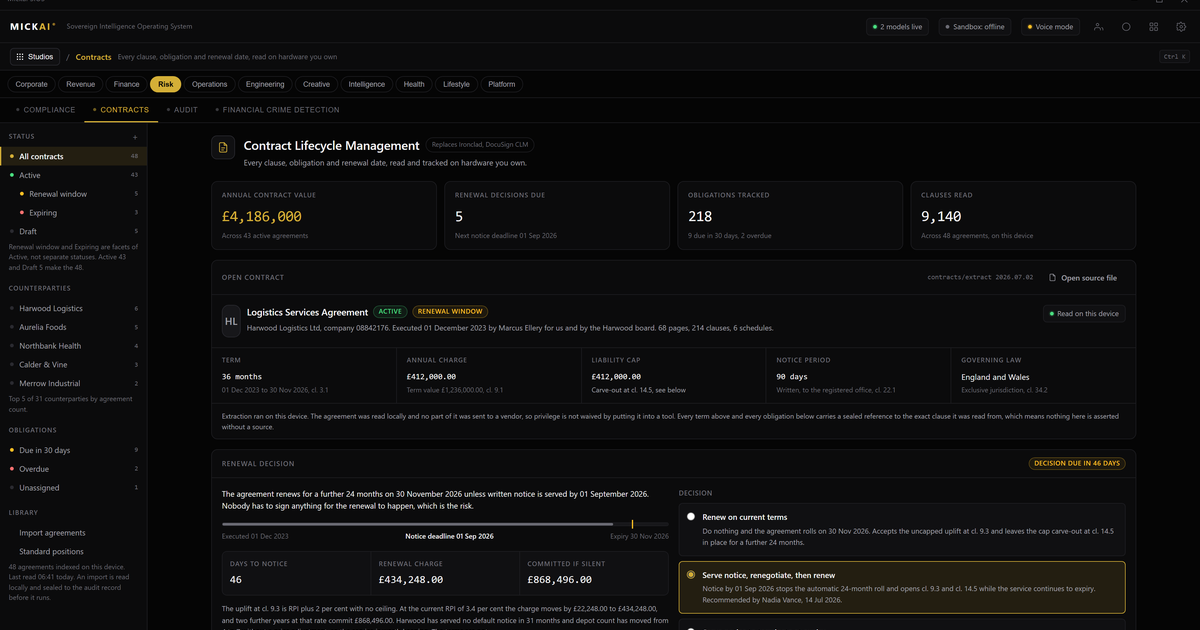
The legal studio lets a firm draft, review and retain contracts on hardware it owns, with privilege preserved because the documents never leave the building. It runs on the MICKAI sovereign operating system, air-gapped by default, and every output the assistant produces is backed by an offline-verifiable record of how it got there. No contract text is sent to a vendor, so the confidentiality that legal privilege depends on stays intact.
That is the whole point. Most legal AI works by sending your clause library, your draft and your counterparty's redlines to someone else's servers to be processed. For a regulated firm, or any matter where disclosure would be damaging, that is the wrong trade. We start from private deployment where the vendor cannot see your data, and we go further: the data sits on your own storage, the model runs on your own machines, and there is no outbound path for a document to take.
What the legal studio does
The studio covers the everyday work of a legal function without any of it touching an external service.
Drafting. Start from your own templates and playbook. The assistant produces first drafts of NDAs, service agreements, employment contracts, licensing terms and side letters using your standard clauses and your house style, not a generic public model's idea of a contract. Because it reads your executed precedents, the drafts already reflect positions your firm has taken before.
Review and redlining. Point the assistant at an inbound contract and it flags departures from your positions: liability caps, indemnities, termination triggers, auto-renewal, governing law, data-processing terms. It explains why each clause matters and proposes fallback language. You keep the judgement; it does the reading.
Comparison. Put two versions side by side and get a clean account of what changed between them and what those changes mean commercially. Useful when a counterparty returns a document three rounds deep and buries a shift in the definitions.
Retention. Executed documents are filed and kept on your storage with their metadata, key dates and obligations extracted. Renewal and notice deadlines surface before they lapse. The record stays under your control for as long as your retention policy requires, not for as long as a vendor keeps your tenancy alive.
Why privilege survives here
Legal professional privilege rests on confidentiality. The moment privileged material is shared with a third party who can read it, you risk waiver. Ordinary cloud legal tools create exactly that exposure: your draft and your advice pass through infrastructure a vendor operates and can, in principle, access.
In the legal studio there is no third party in the loop. The documents are drafted, analysed and stored on machines you own. The assistant runs locally against your files. There is no upload, no external processing step, no vendor tenancy holding your matter files. Confidentiality is preserved by architecture, not by a promise in a contract you did not get to negotiate.
Air-gapped by default matters here too. When the studio has no internet connection at all, there is no channel through which a document could leave, deliberately or by misconfiguration. For sensitive litigation, M&A work or regulated advice, that is the difference between a policy and a fact.
The Open Audit Record: proving how an output was reached
AI in legal work raises an obvious question. If the assistant drafted a clause or flagged a risk, how do you know why, and can you stand behind it later?
Every action the assistant takes is written to the Open Audit Record. It captures which documents were read, which clauses were cited, which steps were taken and in what order. The record is offline-verifiable, meaning you can reconstruct the reasoning behind any output on your own hardware without contacting us or anyone else.
This is action-level audit, not a vague usage log. If a partner asks how the assistant reached a conclusion, or if the work is later scrutinised, you have a concrete, checkable account. It also makes supervision practical: a supervising solicitor can see exactly what the tool did before signing off on advice that goes out under the firm's name.
One operating system, not another point tool
The legal studio is one studio on the MICKAI sovereign operating system, which spans 63 studios on a single platform. Clients onboard onto an initial focused set and add more as they go.
The point of that design is shared data under one governed record. A contract in the legal studio, an invoice in the finance studio and a thread in the email system are the same company's data, reachable by the same assistant. When a supplier agreement changes, the obligation can flow to the team that has to meet it. When a matter closes, the finance and records views agree because they draw on one source, not three synced copies.
Firms usually assemble this from separate subscriptions: a contract lifecycle tool, a document management system, an e-signature service, a matter-management platform, each with its own login, its own copy of your data and its own monthly bill per user. Here it is studios on the operating system your firm already owns and runs, with one assistant across all of them.
The cost of renting versus owning
Consider the software a small legal function typically rents. Microsoft 365 Business Standard is published at 12.30 US dollars per user per month. Take a conservative worked example: a 20-person firm on that single plan is 20 users times 12.30 dollars times 12 months, which is 2,952 dollars a year, for the office suite alone. Add a dedicated contract-management subscription, an e-signature plan and a matter-management seat on top, each billed per user per month, and the annual figure climbs well past that before anyone has drafted a clause.
The assumption in that example is one published plan at its list price for a 20-person firm across a full year. The prices are the incumbents' own reported list prices; the point is the method, not a precise total for your firm. What matters is the shape of it: rented software is a per-user bill that recurs every year and rises when you add people, and the data lives in the vendor's tenancy for as long as you keep paying.
Owning the operating system inverts that. The software runs on hardware you bought, the studios are yours to run, and your data does not sit in someone else's account. We do not publish MICKAI pricing here; the comparison worth making is between a recurring per-seat rent whose total grows with headcount and a stack a firm owns and controls.
Who this is for
We built the legal studio for the regulated small and mid-sized firm that the heavyweight vendors tend to leave behind: the practice that needs proper confidentiality and a real audit trail but does not have an enterprise procurement team or a budget for bespoke integration. In-house legal teams at regulated companies sit in the same position. The requirement is the same in both cases: keep the documents in the building, keep privilege intact, and be able to prove how the assistant did what it did.
FAQ
Does using AI on contracts waive legal privilege? It can, if the contract text travels to a third party who can read it. The legal studio runs on hardware you own with no outbound path, so privileged material is never disclosed to a vendor and the confidentiality that underpins privilege is preserved.
Where do our contracts and matter files actually sit? On your own storage, inside your own building or air-gapped network. Drafting, review, comparison and retention all happen locally. Nothing is uploaded to a cloud tenancy you do not control.
How do we prove how the assistant reached an output? Every action the assistant takes is written to the Open Audit Record, an offline-verifiable log of the documents read, the clauses cited and the steps taken. You can reconstruct any output without calling a vendor.
Is this one tool or part of something bigger? It is one studio on the MICKAI sovereign operating system, which spans 63 studios. The same assistant and the same data work across legal, finance, HR and the rest, so a contract, an invoice and an email share one governed record.
Can it work fully offline? Yes. The studio is air-gapped by default. It needs no internet connection to draft, review or retain documents, which suits regulated firms and any matter where disclosure risk is unacceptable.
Do you hold security certifications? No. We hold none and we do not claim any. What we offer instead is a deployment where the data never leaves your hardware and every AI action is recorded in a log you can verify yourself.
Frequently asked questions
Does using AI on contracts waive legal privilege?
It can, if the contract text travels to a third party who can read it. The legal studio runs on hardware you own with no outbound path, so privileged material is never disclosed to a vendor and the confidentiality that underpins privilege is preserved.
Where do our contracts and matter files actually sit?
On your own storage, inside your own building or air-gapped network. Drafting, review, comparison and retention all happen locally. Nothing is uploaded to a cloud tenancy you do not control.
How do we prove how the assistant reached an output?
Every action the assistant takes is written to the Open Audit Record, an offline-verifiable log of the documents read, the clauses cited and the steps taken. You can reconstruct any output without calling a vendor.
Is this one tool or part of something bigger?
It is one studio on the MICKAI sovereign operating system, which spans 63 studios. The same assistant and the same data work across legal, finance, HR and the rest, so a contract, an invoice and an email share one governed record.
Can it work fully offline?
Yes. The studio is air-gapped by default. It needs no internet connection to draft, review or retain documents, which suits regulated firms and any matter where disclosure risk is unacceptable.
Do you hold security certifications?
No. We hold none and we do not claim any. What we offer instead is a deployment where the data never leaves your hardware and every AI action is recorded in a log you can verify yourself.