One assistant across every studio, running on your own hardware
One MICKAI assistant reaches across email, meetings, CRM and team management on your own hardware, offline, seeing all your data without sending it out.
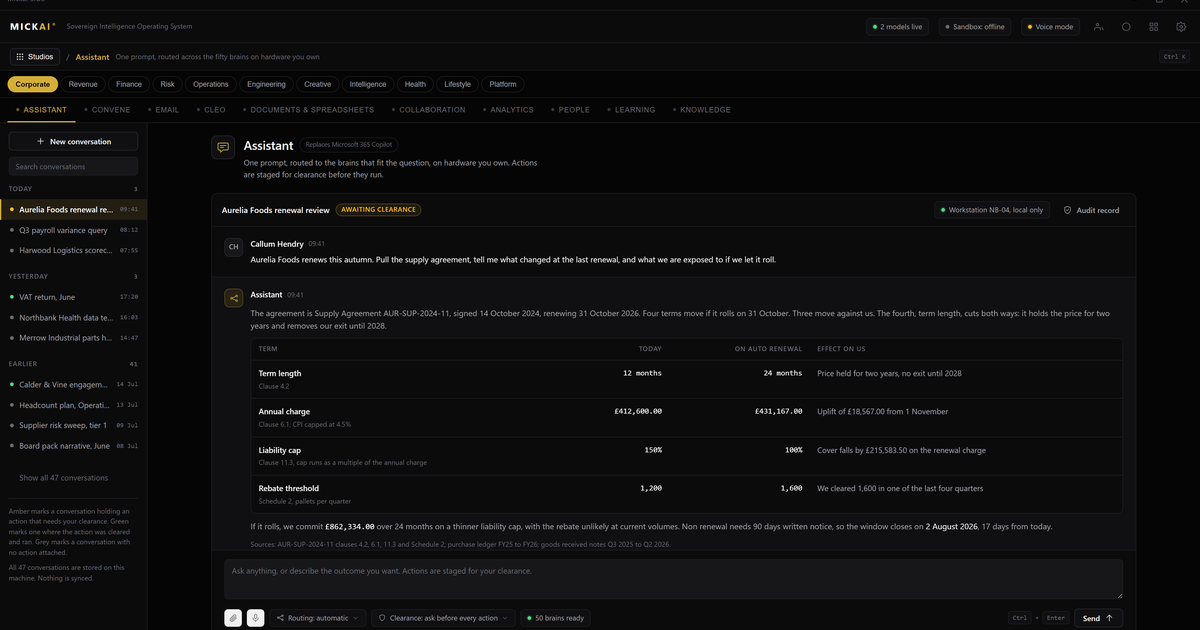
Most companies now run one AI copilot per app: one in email, one in the chat tool, one bolted onto the CRM. Each one is a separate subscription, each sees only its own corner, and each sends your prompts to the vendor's cloud. We built the opposite. One assistant runs across every studio on our sovereign operating system, reads all of the company's own data, and does it on hardware the customer owns, offline by default.
That single difference, one assistant with the whole picture instead of many with slivers, is what changes the work it can do for you.
One assistant, not a dozen copilots
Open a typical business software stack and count the assistants. There is a writing helper in the mail client, a meeting summariser in the video tool, a lead-scoring bot in the CRM, a ticket helper in the service desk. None of them can see each other. Ask the mail copilot about a customer and it knows the thread in front of it and nothing else. Ask the CRM copilot to draft a follow up and it cannot read the meeting that just happened.
Our assistant is one system. Because every studio runs on the same operating system and shares the same data, the assistant can read the email, the meeting notes, the CRM record and the project status together, then act. Draft the follow up from what was actually said in the meeting. Flag the deal that has gone quiet against the last three interactions. Pull the numbers from the finance studio into the board pack without anyone exporting a spreadsheet.
This is the practical benefit of one operating system rather than a shelf of separate apps. The intelligence is not trapped inside one product. It reaches across all of them.
What the assistant reaches across
The assistant is not a feature of one studio. It drives the studios a company switches on. In a typical starting set that includes:
- Our email system. Read, triage, draft and search the company's mail without any of it leaving the building.
- Our meetings and collaboration platform. Join, transcribe and summarise meetings, then turn decisions into tasks and messages to the right people.
- Our CRM. Keep records current from the conversations that actually happened, surface deals that need attention, prepare the next step.
- Our team management. See who is working on what, where work is stuck, and what is due, then help the manager act on it.
- The other studios. Finance, documents, projects and the rest of the set, all on the same operating system and the same data.
Because these are studios on one operating system and not separate products stitched together with integrations, the assistant does not need a fragile web of connectors to see across them. The data is already in one place, on the company's own hardware. The assistant simply has permission to read it.
Why running on your own hardware matters
A cloud copilot has to send something to the vendor to be useful. Your prompt, often the document you are working on, sometimes a copy of the surrounding data for context. That is the design. The intelligence lives on the vendor's servers, so your data has to travel to it.
Our assistant runs the other way around. The intelligence lives on hardware the customer owns, inside their own building or data centre. The company's data never has to move to reach it. The assistant works offline and air-gapped by default. There is no outbound connection to a third party unless the customer deliberately makes one.
For a regulated firm this is the difference between a tool it can use on client data and a tool it cannot. A law firm, a clinic, a finance business handling other people's money cannot pipe that data to an outside AI service and stay comfortable. An assistant that reads everything locally and sends nothing out removes that problem at the root. Private deployment where the vendor cannot see your data is the baseline we start from, not a premium add on.
Every action on the record
Seeing all of the company's data is powerful, so it has to be accountable. Every action the assistant takes is written to the Open Audit Record: what it read, what it changed, and when. Not a chat transcript, an action-level log.
If the assistant updated a CRM record, sent a draft to a colleague or pulled a figure into a report, that is on the record and a human can check it. This is what makes an assistant that can see everything safe to run in a regulated business. You are not trusting a black box. You can prove what it did.
The money you stop renting
Here is the part a finance director cares about. The per user, per month subscriptions for the incumbent tools add up, and they never stop.
Take the published list prices as reported public facts. Microsoft 365 Business Standard is listed at 12.30 US dollars per user per month. Slack's paid Pro plan is listed at 8.75 US dollars per user per month. Salesforce Sales Cloud starts, on its published pricing, at 25 US dollars per user per month for the entry tier and far more for the tiers most firms actually buy. Zoom, Google Workspace and the rest sit alongside them.
Work a conservative example. Assume a 100 person company. Take only Microsoft 365 Business Standard at 12.30 dollars, Slack Pro at 8.75 dollars and Salesforce entry at 25 dollars. That is 46.05 dollars per user per month before anyone adds a single premium AI seat on top. Across 100 users that is 4,605 dollars a month, and 55,260 dollars a year. Every year. Forever. And the AI copilots that sit on those tools are usually a further paid seat again.
That is three tools. Most firms run more. The number is a floor, not a ceiling, and it is a rental you never stop paying and never own anything for.
We do not publish our pricing, and this is not a price comparison. It is a framing. With our operating system the studios are software your company runs on hardware it owns, not seats it rents from four different vendors forever. The assistant that drives all of them is part of the same stack, not another per seat line on the invoice.
Software you run, not a model you integrate
The last difference is the biggest one and the easiest to miss. Most sovereign AI offers are a model. You still have to build the software around it, connect it to your systems, and maintain the integrations. The model is a component you are handed.
We ship the whole software stack a company runs on. The 63 studios and the assistant across them are the applications, on one operating system, on the customer's hardware. There is no integration project to make the assistant see your CRM, because your CRM is a studio on the same operating system. This is the gap the heavyweight vendors leave open, especially for the regulated small and mid-sized firm that cannot staff a year long systems integration and does not want to send its data to anyone.
Companies onboard onto an initial focused set of studios and switch on more as they need them. The assistant is there from the first one, and it gets more useful with every studio the company adds, because there is more of the company's own data for it to see.
FAQ
What is the MICKAI assistant? It is one assistant that works across every studio on our sovereign operating system: email, meetings, CRM, team management and the rest. It reads the company's own data and takes action on it, running on hardware the customer owns.
Where does the assistant run? On the customer's own hardware, inside their own building or data centre. It works offline and air-gapped by default. Nothing is sent to a third party unless the customer chooses to connect something.
How is this different from a cloud copilot? A cloud copilot is a bolt-on that sends your prompts and often your data to the vendor's servers. Our assistant sits inside the operating system your company runs on, sees your own data locally, and never needs to leave the building.
Can the assistant see all of the company's data at once? Yes, across the studios the company has switched on, subject to the permissions the company sets. Because every studio is on one operating system, the assistant works from shared data rather than a dozen disconnected apps.
Is there an audit trail of what the assistant does? Every action the assistant takes is written to the Open Audit Record, so you can see exactly what it read, what it changed and when. This is action-level audit, not just a chat log.
How many studios are there? The platform spans 63 studios on one sovereign operating system. Companies onboard onto an initial focused set and switch on more as they need them.
Frequently asked questions
What is the MICKAI assistant?
It is one assistant that works across every studio on our sovereign operating system: email, meetings, CRM, team management and the rest. It reads the company's own data and takes action on it, running on hardware the customer owns.
Where does the assistant run?
On the customer's own hardware, inside their own building or data centre. It works offline and air-gapped by default. Nothing is sent to a third party unless the customer chooses to connect something.
How is this different from a cloud copilot?
A cloud copilot is a bolt-on that sends your prompts and often your data to the vendor's servers. Our assistant sits inside the operating system your company runs on, sees your own data locally, and never needs to leave the building.
Can the assistant see all of the company's data at once?
Yes, across the studios the company has switched on, subject to the permissions the company sets. Because every studio is on one operating system, the assistant works from shared data rather than a dozen disconnected apps.
Is there an audit trail of what the assistant does?
Every action the assistant takes is written to the Open Audit Record, so you can see exactly what it read, what it changed and when. This is action-level audit, not just a chat log.
How many studios are there?
The platform spans 63 studios on one sovereign operating system. Companies onboard onto an initial focused set and switch on more as they need them.