Team management inside your own operating system
Run people, tasks and projects inside your own sovereign OS, with one assistant across email, meetings and CRM. No extra subscription.
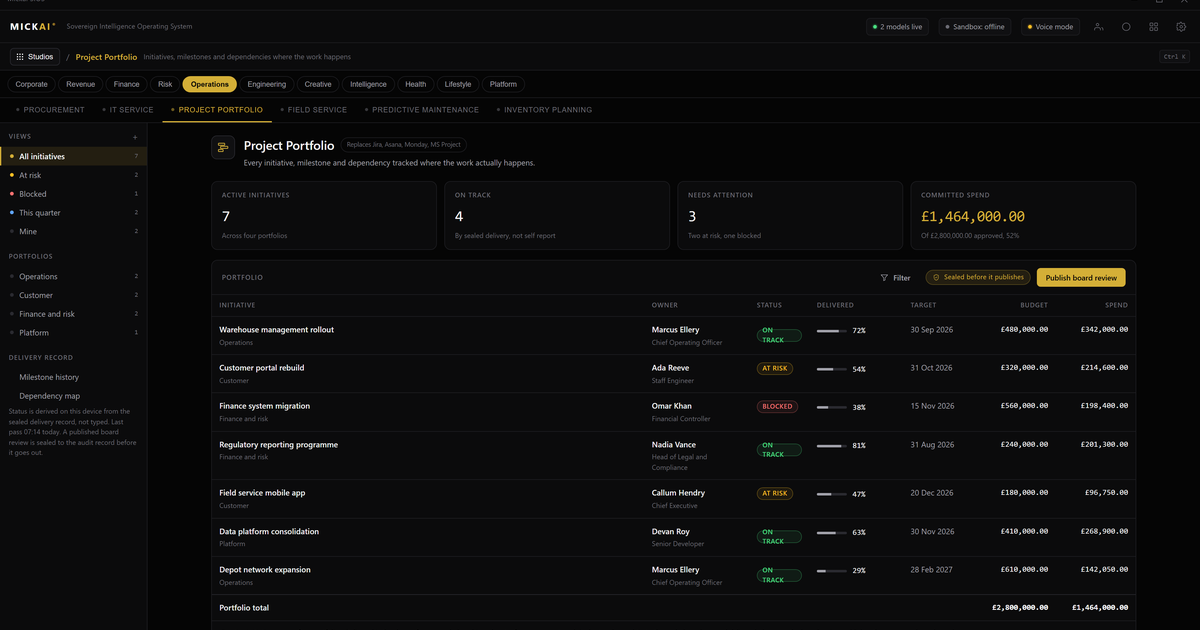
Team management inside your own operating system means your people, tasks and projects run as a studio on the same machine that already holds your email, meetings and CRM. Assignments, workloads, timelines and boards live next to the data they depend on, and one assistant works across all of it. You are not buying another separate subscription and stitching it to everything else. You own the whole stack.
That is the difference. Most companies run project management in one vendor's cloud, chat in another, email in a third and CRM in a fourth. Every tool holds a slice of the truth and none of them holds all of it. Our team management studio starts from one operating system where the slices are already the same data.
What the team management studio actually does
It handles the work most teams expect from a project tool, and then some.
- People: who is on which team, their roles, their current workload and their availability.
- Tasks: assignments, priorities, dependencies, checklists and status, with clear ownership.
- Projects: timelines, milestones, boards and portfolio views across everything in flight.
- Reporting: where time goes, what is late, what is at risk and what shipped.
None of that is unusual on its own. What is unusual is where it sits. Because it runs on the sovereign operating system alongside the company's email, meetings and CRM, a task is not an island. It can point at the client it serves, the meeting that created it and the thread where it was agreed.
One place, not four subscriptions
Consider what a normal mid-sized firm rents to run its teams. A project tool per user per month. A chat platform per user per month. Email and documents per user per month. A CRM per user per month. Each one is a login, a bill, an admin console and a data silo.
Our answer is one operating system with studios on top. Team management is one studio. Email is another. Meetings and collaboration is another. CRM is another. They are not four vendors you integrate. They are one system that already shares the company's own data, because it all lives on the same hardware you own.
The practical benefit is boring and large: less admin, fewer contracts, no export-import dance between tools, and one place to look when you need the whole picture.
What owning it saves you
We do not publish our pricing, and this article will not state it. But the incumbents publish theirs, so you can do the arithmetic on what you rent today.
Take the published list prices as reported public facts, per user per month, on standard business plans. A common combination is a productivity suite in the region of the low double digits per user per month, a chat platform on top, and a CRM that on its professional tiers runs well into the tens of dollars per user per month. Salesforce, for example, publishes CRM plans that reach into the high tens and hundreds of dollars per user per month depending on tier.
Here is a conservative worked example. Take a 100 person firm. Assume a blended figure of 40 dollars per user per month across a productivity suite, a chat tool and a mid-tier CRM, which is a cautious number given published professional CRM pricing alone. That is:
100 users times 40 dollars times 12 months, which is 48,000 dollars a year, every year, rented and rising.
The assumption is stated plainly: 40 dollars blended, per user, per month. Move the inputs to match your own contracts and the method holds. The point is not the exact figure. The point is that it is a recurring bill for software you never own, on infrastructure you never control, and it grows with every seat you add. Owning the stack changes the shape of that cost.
The assistant across all of it
The reason one operating system beats four subscriptions is not only cost. It is the assistant.
Our assistant works across every studio at once. It reads the meeting where a decision was made and creates the tasks. It sees a project slipping and drafts the email to the client before you ask. It notices that an account in the CRM has an open risk and flags it against the live deadline in the project board. It can do this because there is no wall between the tools. There is one system and one set of data.
A chat bot bolted onto a single app cannot do that. It only sees its own app. Ours sees the company, because the company runs on one operating system.
Where sovereignty comes in
The private deployment where the vendor cannot see your data is where we start, not where we stop. Your project data, your people data, your client data all sit on hardware you own, air-gapped by default.
Beyond that baseline, three things matter for team management specifically.
- Action-level audit. Every action across the studios carries an entry in the Open Audit Record. Who reassigned the task, who moved the deadline, who exported the client list, and when. For regulated firms this is the difference between trusting a log and proving one.
- The whole stack, not a model to integrate. This is the software a company runs on, not an add-on you wire into someone else's platform. Team management, email, meetings and CRM are studios on the same system.
- Built for the regulated small and mid-sized firm. The heavyweight vendors chase the largest accounts. We build for the firm that has real compliance obligations and a real budget but not a thousand-seat contract.
How you start
The platform spans 63 studios on one sovereign operating system. No firm switches on all of it at once, and none should. Clients onboard onto an initial focused set that matches their priorities. For most, team management sits early in that set, because it is where the rest connects: the email, the meetings and the CRM all feed the work, and the work is what the business is measured on.
You start with the studios you need, on hardware you own, with one assistant across them. You extend from there.
FAQ
What does the team management studio do? It runs your people, tasks and projects in one place: assignments, workloads, timelines, boards and status. Because it sits on the same operating system as your email, meetings and CRM, the work is already connected to the data it depends on.
Is this another separate subscription? No. It is a studio on the MICKAI sovereign operating system, on hardware you own. It is not a standalone app you rent per seat on top of everything else you already pay for.
How is it different from Microsoft, Slack or Salesforce tools? Those are separate services from separate vendors, each holding a slice of your data on their infrastructure. Ours are studios on one operating system that holds your data on your hardware, with one assistant across all of them.
Can the assistant work across projects, email and meetings together? Yes. The assistant reads across studios, so it can turn a meeting decision into tasks, chase an overdue project by email, or flag a client risk from the CRM against a live deadline.
Where does our project data live? On hardware you own, air-gapped by default. The vendor cannot see it. Every action carries an entry in the Open Audit Record so you can see who did what and when.
How many studios are there and where do we start? The platform spans 63 studios on one operating system. Clients onboard onto an initial focused set that matches their priorities, then extend from there.
Frequently asked questions
What does the team management studio do?
It runs your people, tasks and projects in one place: assignments, workloads, timelines, boards and status. Because it sits on the same operating system as your email, meetings and CRM, the work is already connected to the data it depends on.
Is this another separate subscription?
No. It is a studio on the MICKAI sovereign operating system, on hardware you own. It is not a standalone app you rent per seat on top of everything else you already pay for.
How is it different from Microsoft, Slack or Salesforce tools?
Those are separate services from separate vendors, each holding a slice of your data on their infrastructure. Ours are studios on one operating system that holds your data on your hardware, with one assistant across all of them.
Can the assistant work across projects, email and meetings together?
Yes. The assistant reads across studios, so it can turn a meeting decision into tasks, chase an overdue project by email, or flag a client risk from the CRM against a live deadline.
Where does our project data live?
On hardware you own, air-gapped by default. The vendor cannot see it. Every action carries an entry in the Open Audit Record so you can see who did what and when.
How many studios are there and where do we start?
The platform spans 63 studios on one operating system. Clients onboard onto an initial focused set that matches their priorities, then extend from there.