Sovereign AI for estate and letting agents
Run your agency on studios you own: CRM, documents, email and scheduling, with applicant and landlord data on your own hardware.
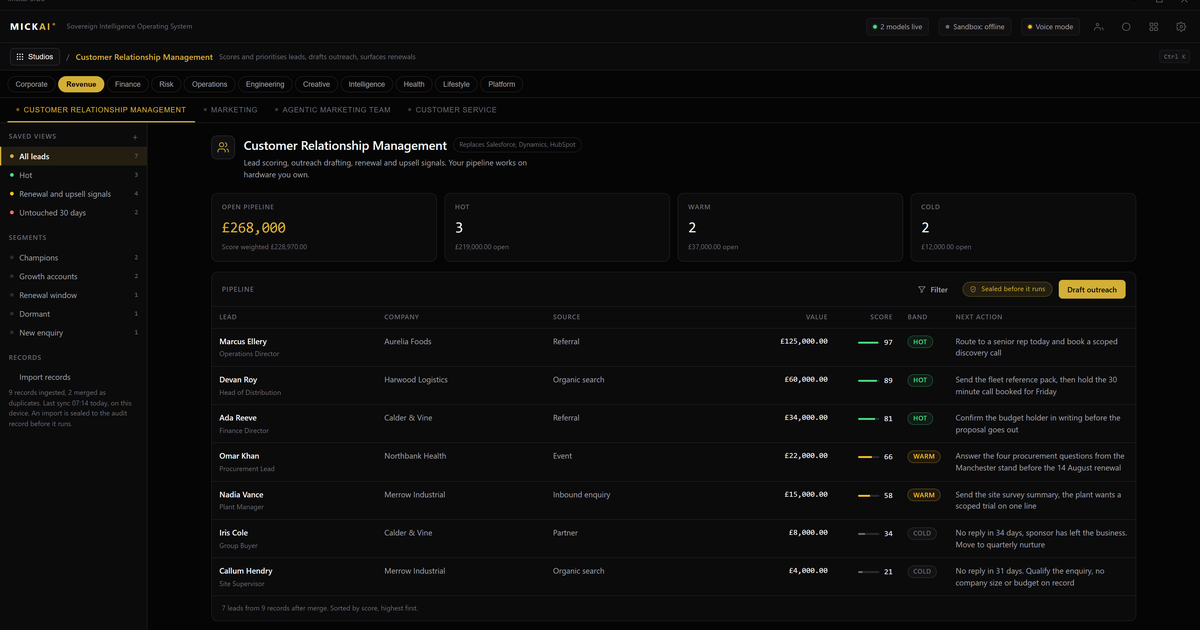
Sovereign AI for estate and letting agents means running the agency on software you own rather than renting it. The CRM that holds your applicants, landlords and vendors, the documents studio that holds tenancy agreements and ID, the email system and the viewings diary all run as studios on the MICKAI sovereign operating system, on hardware in your office. One assistant works across all of it, and the personal data you are trusted with never leaves the building.
The tools an agency runs, on one system
An estate or letting agency runs on a short list of jobs. You keep records of applicants, landlords, vendors and tenants. You send and receive a lot of email. You book and rearrange viewings and valuations all day. You produce and store documents: tenancy agreements, references, right to rent evidence, EPCs, inventories, deposit paperwork. Most firms buy a separate cloud product for each of these and pay to bolt them together.
We give you the same jobs as studios on one operating system. Our CRM holds every applicant, landlord and vendor with the full history against each. Our documents and file studio holds the tenancy files, ID and inventories. Our email system runs the office mailboxes. Our scheduling studio runs the viewings and valuations diary. Because they are studios on the same system, they already share one data store, so there is no connector to license and no sync job that leaves two products disagreeing about a booking.
Applicant and landlord data stays in the building
Estate and letting agencies hold some of the most sensitive personal data any small business handles. Passport and driving licence scans, right to rent checks, bank references, salary details, landlord bank accounts, tenant histories. In a typical cloud setup all of that sits on a vendor's servers in a region you do not control.
With our system the entire store is on hardware your agency owns. When a negotiator opens an applicant, the record is read from local hardware. When they upload a reference or an ID scan, it is written to local hardware. Nothing crosses your boundary to make the product work.
That is the baseline we start from: a deployment where the vendor cannot see your data. Private cloud gets you part of the way. We go further. The studios are air-gapped by default, so they function with no connection to the outside, and every action is written to an audit record you hold. When a landlord or a tenant asks where their data lives and who can see it, the honest answer is: here, on our hardware, in our office.
The CRM: applicants, landlords, vendors in one place
The CRM is the core of the agency. It holds applicants with their requirements and budget, landlords with their portfolios, vendors with their instructions, and the full history of calls, emails and viewings against each. Sales and lettings work from the same records, so nobody is chasing a version of a contact that is out of date.
Match an applicant to a property and the CRM already knows the viewings booked, the offers made and the emails sent. Ask the assistant which applicants have gone quiet and it reads the last contact date across the pipeline and tells you. The value is not a clever model in someone else's cloud. It is a capable assistant that can see the whole picture because the whole picture is in one place you own.
Documents and files without a separate cloud
Tenancies generate paper. Agreements, guarantor forms, references, inventories, check-in and check-out reports, deposit protection paperwork, renewal notices. Our documents and file studio holds all of it against the right property and tenancy, on your hardware, versioned and searchable.
Because the files sit on the same operating system as the CRM and the mailbox, a tenancy file already links to the tenant record and the email thread that produced it. You draft an agreement, the assistant can pull the tenant and landlord details straight from the CRM record. Nothing is copied out to a third party document cloud to be edited and copied back.
Email and the viewings diary, shared with everything
Our email system runs the office mailboxes on the same foundation. When an applicant replies to a viewing invitation, that reply is already attached to their CRM record. Nobody drags it across. When you open the applicant you see the full thread in place.
The scheduling studio runs the diary. Book a viewing or a valuation and it lands against the property and the applicant at once. Rearrange it and every studio sees the change immediately, because there is one record, not three copies kept in step by a nightly job. After a viewing the assistant can draft the feedback email to the vendor, update the applicant's status and set the follow-up, because it reads across the CRM, the mailbox and the diary together. It is one assistant across every studio, working from your data on your hardware.
What it costs to rent the alternative
We do not publish MICKAI pricing. What we can do is show you the recurring bill the incumbents publish, so you can model your own number honestly.
The rented stack is sold per user per month, billed every year, forever. A productivity and mail suite from a large vendor, a cloud CRM, a chat tool, a scheduling tool: each carries its own published per seat list price on the vendor's own website, and each recurs. The exact figure depends on the tier you pick and moves over time, so use the current list price for the edition you would actually buy. The method matters more than any single number, so here is the method.
Take your seat count. Multiply by the vendor's published price per user per month. Multiply by twelve. That is one product for one year. A worked example with a stated assumption: a 25 person agency, on a published mail and productivity list price of 10 pounds per user per month, is 25 times 10 times 12, which is 3,000 pounds a year for that one suite. Add a cloud CRM at a published 60 pounds per user per month for the 25 seats and that is 25 times 60 times 12, or 18,000 pounds a year on top. Those are illustrative figures on a stated assumption, not a quote; put in your real seat count and the real published price for each product you actually rent, and you have your own annual bill.
Now hold that recurring number against the shape of what we offer: the CRM, the documents studio, the email system and the diary running as studios on one operating system, on hardware your agency owns, rather than four separate subscriptions you rent in perpetuity. We are not going to print our price here. We are saying: total the subscriptions you would pay year after year, and measure them against owning the tools instead.
Built for the regulated small and mid-sized firm
The heavyweight vendors are built for very large buyers. The independent agency and the regional group get the same multi-tenant cloud with none of the leverage and all of the exposure, while carrying real duties on money laundering checks, right to rent, deposit protection and data protection. If a regulator, a landlord or a tenant asks where the personal data sits and who can see it, "a vendor cloud in a region we do not control" is an awkward answer.
Our system gives that firm a straight answer. The data is here, on our hardware, in our office. Access is logged at the action level in the Open Audit Record, so we can show who viewed, edited or exported a record. It runs air-gapped, so an outside connection is not a condition of getting to your own diary. To be clear about what we do not claim: we hold no SOC 2, ISO or Cyber Essentials certification. What we give you is architectural control and a full action level audit trail on kit you own, which is what most of these questions are really about.
The wider platform
The CRM, the documents studio, the email system and the diary are four studios. The operating system spans 63 studios on the same foundation, and agencies onboard onto a focused initial set rather than switching everything at once. The point is not the count. The point is that the tools your agency runs on are the same system, sharing your data, running on your hardware. You own the applicant and landlord relationships, and you own the software that manages them.
Frequently asked questions
Where does applicant and landlord data sit? On hardware your agency owns. Applicant references, ID, right to rent checks, landlord accounts and tenancy files live in your office or your private rack, not a vendor cloud. Nobody outside the firm holds a copy.
Which tools does an agency actually get? A CRM for applicants, landlords and vendors, a documents and file studio, an email system, a scheduling and viewings diary, and one assistant across all of them. They are studios on one operating system sharing your data.
How does it compare on price to Microsoft, Google and the CRM vendors? Those vendors publish a per user per month price that recurs forever. We publish no MICKAI price. Take your seat count, multiply by the vendor's list price, multiply by twelve, and hold that yearly rental against owning the software.
Does it keep working when the internet drops? Yes. The studios are air-gapped by default and run on local hardware, so the diary, the CRM and the files stay available on a branch with no outside connection.
Is this a finished product or an early build? They are working studios, part of 63 studios on one operating system. Agencies onboard onto a focused initial set rather than all of them at once.
What stops a leaver walking off with the applicant list? Every action is written to the Open Audit Record, so exports, edits and views are logged at the action level on hardware you own, for you to review.
Frequently asked questions
Where does applicant and landlord data sit?
On hardware your agency owns. Applicant references, ID, right to rent checks, landlord accounts and tenancy files live in your office or your private rack, not a vendor cloud. Nobody outside the firm holds a copy.
Which tools does an agency actually get?
A CRM for applicants, landlords and vendors, a documents and file studio, an email system, a scheduling and viewings diary, and one assistant across all of them. They are studios on one operating system sharing your data.
How does it compare on price to Microsoft, Google and the CRM vendors?
Those vendors publish a per user per month price that recurs forever. We publish no MICKAI price. Take your seat count, multiply by the vendor's list price, multiply by twelve, and hold that yearly rental against owning the software.
Does it keep working when the internet drops?
Yes. The studios are air-gapped by default and run on local hardware, so the diary, the CRM and the files stay available on a branch with no outside connection.
Is this a finished product or an early build?
They are working studios, part of 63 studios on one operating system. Agencies onboard onto a focused initial set rather than all of them at once.
What stops a leaver walking off with the applicant list?
Every action is written to the Open Audit Record, so exports, edits and views are logged at the action level on hardware you own, for you to review.