Sovereign AI for architecture and engineering firms
Own your studios, design files and client data. One sovereign OS runs documents, projects, finance and email in your building, with one assistant.
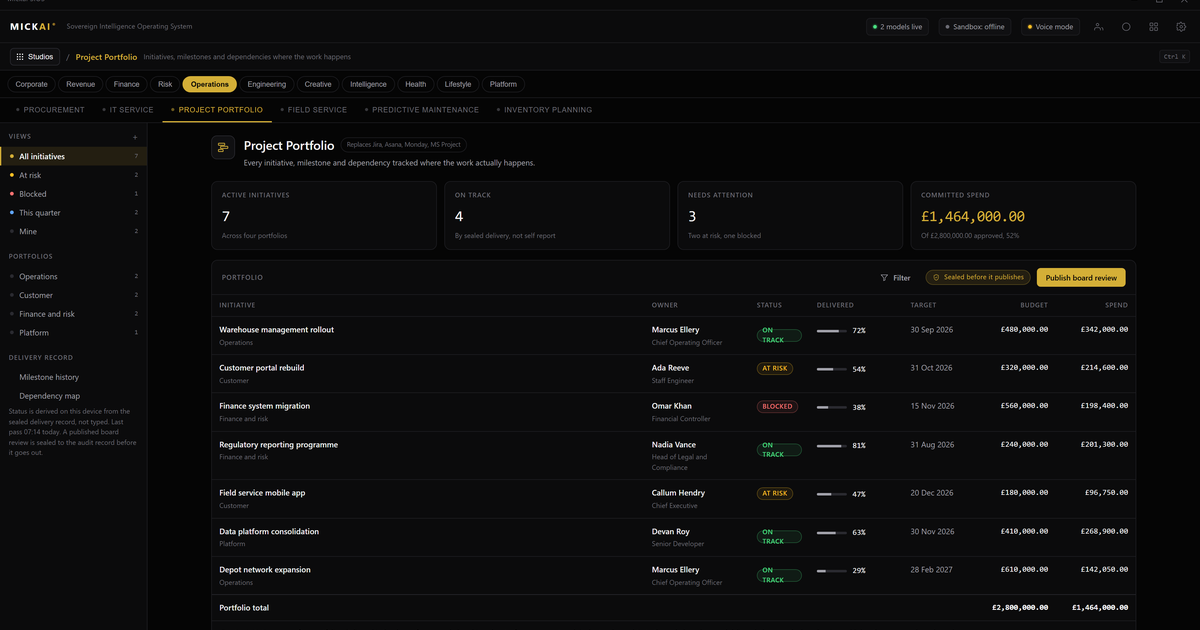
Architecture and engineering firms can now own the software their practice runs on, rather than rent it month by month. The documents, the programme, the finance ledger, the email and the assistant across all of it run on one sovereign operating system, on hardware you own, with your drawings and client data staying inside your building. You stop paying per user per month for tools that hold your files on someone else's servers.
That is the whole idea. Not a set of separate apps stitched together, but studios on one operating system, sharing one store of your own data, with a single assistant that can see across the lot within the permissions each person holds.
The studios a practice actually runs
A working practice needs a handful of things every day. It needs somewhere to write and store documents. It needs to run projects and keep the programme honest. It needs to invoice, track fees and watch cash. It needs email and a calendar. It needs to meet, and to talk to itself through the day. Most firms rent each of these from a different vendor and pay per seat for every one.
On our sovereign operating system these arrive as studios, not separate subscriptions:
- Our document system, for drawings registers, specifications, reports, contracts and the day to day writing a practice produces.
- Our project management studio, for programme, tasks, resourcing and the RIBA or engineering stage gates a job moves through.
- Our finance studio, for fee proposals, invoices, timesheets and the cash position across live jobs.
- Our email and calendar system, so correspondence and diaries live on your hardware, not a mail cloud.
- Our meetings platform, for design reviews and client calls, with notes that land back in the project.
- Our chat and channels, so the studio floor can talk without a separate messaging bill.
- Our CRM, for the client and consultant relationships that win the next commission.
The point is not that each exists. The point is that they sit on one operating system over one store. A drawing issued in the document system shows up against the right stage in the project studio. Time booked to a job flows to the finance studio. A client thread in email is visible from the CRM. Nothing is exported, re-uploaded or reconciled by hand between vendors, because there are no vendors between them.
Your design and client data stays in the building
For a practice, the sensitive material is the work itself. Concept drawings, structural calculations, tender documents, client identities, site information. On a rented cloud suite that material lives on the vendor's servers, and the assistant features they sell you send it further out to be processed.
We invert that. The store sits on hardware you own, inside your own network. The studios read and write to it there. The assistant runs there too, against your files, so you can ask questions across a project without the project leaving the room. The system is air-gapped by default: it does not need a line to the public internet to do its work, which matters when the job carries public sector, defence-adjacent or critical infrastructure obligations.
This is where we go beyond a private or on-premise cloud licence. Keeping data on your own kit is the baseline. On top of it we add an action-level Open Audit Record, a plain log of what the assistant did, who asked and what it touched, held with your files. You own the record. You can inspect it, keep it, and hand it to a client or an assessor without asking anyone's permission.
One assistant across every project
The reason to put the studios on one operating system is the assistant that sits over them. Because it can see documents, programme, finance and email at once, it answers the questions a practice actually asks.
Which live jobs are past their fee drawdown but behind on issue. What changed in the structural spec between the last two revisions. Which clients we have not billed this month. What the meeting on Tuesday agreed and where that landed in the programme. A rented stack cannot answer these cleanly because the data is scattered across separate vendors that do not share a store. Our assistant can, because they all do.
It works from your own records, not a general model trained on the public web, and it stays inside your permissions. Someone who cannot see a fee is not shown one because they asked the assistant instead of opening the ledger. We do not name the underlying reasoning layer, and it does not matter to the work: what matters is that it reads and drafts and cross-checks against your files, and writes every action to the audit record as it goes.
What renting the same functions costs
Here is the part worth doing with a pencil. The incumbent suites publish their list prices, per user per month, and a practice pays them twelve times a year for every seat.
Take the published figures as reported public facts and build a conservative worked example for a fifty person firm. Business-grade productivity and email suites are commonly listed around GBP 20 to 25 per user per month. A team messaging product is commonly listed around GBP 6 to 12. A mainstream CRM sits far higher, with professional tiers commonly listed from GBP 60 to 100 per user per month and up. Those are list prices you can read on the vendors' own pages; your negotiated rate may differ.
The method is simple: users times price times twelve, for each tool, then add them. Fifty users on a GBP 22 suite is 50 x 22 x 12, which is GBP 13,200 a year for that one function. Add a GBP 8 messaging tool and it is another 50 x 8 x 12, GBP 4,800. Add a CRM at a conservative GBP 65 and it is 50 x 65 x 12, GBP 39,000. On those three alone the arithmetic reaches GBP 57,000 a year, every year, rising as you grow and as prices move, for tools that keep your files on their servers.
We are not going to quote you a MICKAI price in an article. The point of the sum is the shape of it. Rented software is a cost that recurs and compounds for as long as you trade, and never becomes yours. Owning the operating system your practice runs on is a different kind of decision. Run the numbers above against your own seat count and your own renewal quotes, and the case makes itself.
Built for the regulated small and mid-sized firm
We build for the practice that carries serious obligations without a serious IT department. The engineering consultancy on a framework. The architecture studio doing schools, hospitals or defence estate. The firm whose clients now ask, in the tender, where the data sits and who can see it.
That firm does not want to become a platform integrator. It wants the studios ready, the store on its own hardware, the assistant across the work, and an audit record it can show. Ours is the whole software stack, not a single model to wire in yourself. You own it, it runs in your building, and it keeps running whether or not there is a connection to the outside world.
Where this sits
Our estate stands on 104 filed UK patent applications carrying 2,340 claims, and 63 studios on the one sovereign operating system. The studios are distributed through an anonymous partner. None of that is the reason to move. The reason to move is plainer: your drawings, your clients and your fees should live on hardware you own, run by software you own, answered by one assistant that never sends the work outside the building.
FAQ
Where do our design files and client data live? On hardware you own, inside your own building. The studios read and write to one store that never leaves your network. Nothing is copied to a vendor cloud to make the assistant work, and the system runs air-gapped by default.
Do we replace every tool at once? No. Most firms start with one studio, often documents or project management, run it beside what they already have, then move the rest across as trust builds. The studios share one data store, so each one you add makes the others more useful.
Can the assistant see across projects? Yes. Because the studios sit on one operating system over one store, the assistant can answer across documents, programme, finance and email at once, within the permissions each person holds. It works from your own records, not a general model trained on the public web.
How is this different from a private or on-premise version of a cloud suite? Private deployment is our baseline, not our headline. Above it we add an action-level Open Audit Record of what the assistant did, air-gapped operation by default, and the whole software stack rather than a single model you integrate yourself.
Is this only for large practices? No. We build for the regulated small and mid-sized firm, the practice that carries public sector, defence-adjacent or infrastructure work but does not run a large IT function. The system is designed to be owned and run by a small team.
What about audit and record keeping? Every action the assistant takes is written to an Open Audit Record you hold: who asked, what ran, what data it touched. That record sits with your files, on your hardware, and is yours to inspect and keep.
Frequently asked questions
Where do our design files and client data live?
On hardware you own, inside your own building. The studios read and write to one store that never leaves your network. Nothing is copied to a vendor cloud to make the assistant work, and the system runs air-gapped by default.
Do we replace every tool at once?
No. Most firms start with one studio, often documents or project management, run it beside what they already have, then move the rest across as trust builds. The studios share one data store, so each one you add makes the others more useful.
Can the assistant see across projects?
Yes. Because the studios sit on one operating system over one store, the assistant can answer across documents, programme, finance and email at once, within the permissions each person holds. It works from your own records, not a general model trained on the public web.
How is this different from a private or on-premise version of a cloud suite?
Private deployment is our baseline, not our headline. Above it we add an action-level Open Audit Record of what the assistant did, air-gapped operation by default, and the whole software stack rather than a single model you integrate yourself.
Is this only for large practices?
No. We build for the regulated small and mid-sized firm, the practice that carries public sector, defence-adjacent or infrastructure work but does not run a large IT function. The system is designed to be owned and run by a small team.
What about audit and record keeping?
Every action the assistant takes is written to an Open Audit Record you hold: who asked, what ran, what data it touched. That record sits with your files, on your hardware, and is yours to inspect and keep.