Meetings and collaboration you own: our alternative to Microsoft Teams
Calls, meetings, transcripts and team spaces on a sovereign OS. Recordings never leave the building. See the cost against Teams and Zoom.
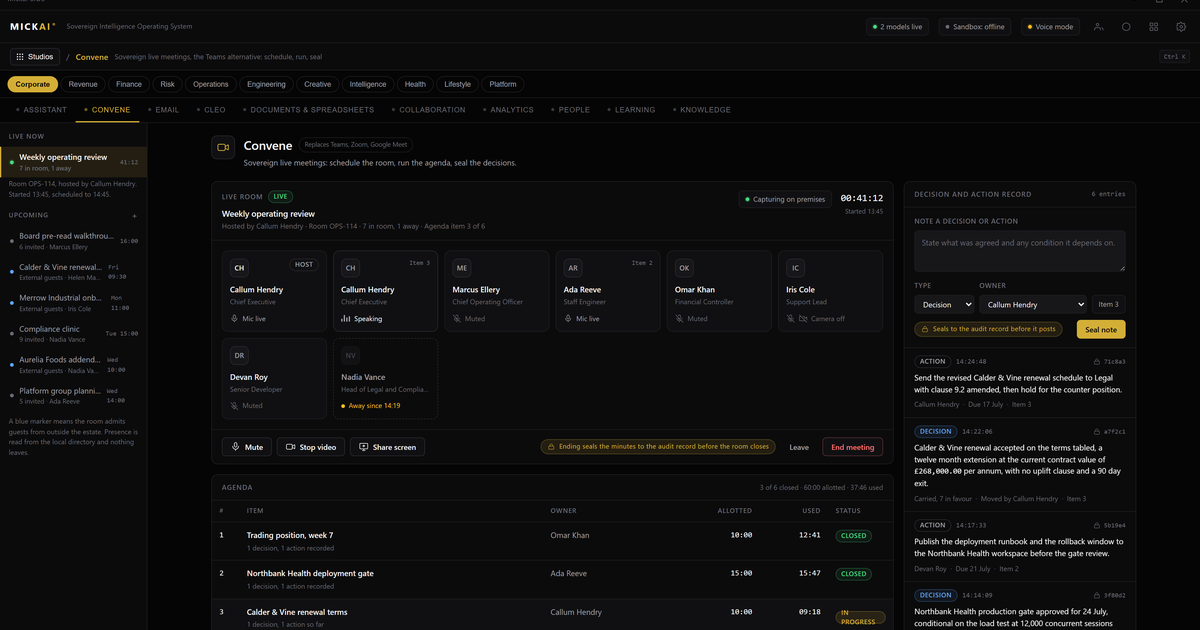
Our meetings and collaboration platform gives you calls, video meetings, live transcripts and persistent team spaces, and every recording and every word of every transcript stays on hardware you own, inside your building. It runs as a studio on the MICKAI sovereign operating system, so it is not another cloud subscription to rent. You stop paying a vendor per user per month for the right to hold your own conversations.
Microsoft Teams and Zoom are rented. You pay for every seat, every month, and your calls and recordings sit on their infrastructure. We invert that. You own the software, you own the machine it runs on, and your meetings never leave the room.
What the studio actually does
The meetings and collaboration studio covers the day to day work a team does together:
- One to one and group voice and video calls.
- Scheduled meetings with recording.
- Live transcription and a searchable record of what was said.
- Persistent team spaces and channels for ongoing threads, files and decisions.
- Screen sharing and shared notes.
None of that is unusual on its own. What is different is where it lives. The call connects across your own network. The recording writes to your own storage. The transcript is generated by a model running on your own hardware, not shipped to a vendor for processing. When the meeting ends, nothing has left the building.
That matters most for the conversations you would never want on someone else's server: a board discussion, a legal review, a deal negotiation, a patient or client case, an incident response. On a rented platform those recordings are processed and stored on infrastructure the vendor controls and can access. On ours they are not.
One operating system, not another app to integrate
The point of the meetings studio is not that it exists in isolation. It is that it sits on the same operating system as everything else you run.
The platform spans 63 studios on one sovereign operating system, and clients onboard onto an initial focused set that fits their work. Email, CRM, team management, meetings and the rest are studios on that one system, not separate products stitched together with connectors. There is one assistant across all of them, and they share your own data.
So a meeting is not a dead end. When a call finishes, the transcript is already inside the same system as your customer records, your projects and your documents. The assistant can pull the action points out of a transcript and turn them into tasks in your team management studio. It can attach the summary of a client call to that client's record in your CRM. It can find the moment three meetings ago when a decision was made, because the record is searchable and it is all yours.
On a rented stack that same flow means exporting from Teams, uploading to a note tool, syncing to a separate CRM, each hop a copy of your data landing on another vendor's servers. Here there are no hops. The data never leaves, because there is nowhere else for it to go.
The audit trail that rented tools do not give you
Every action inside the system is written to an Open Audit Record. That is a log of what happened at the level of the action itself: who joined a call, when a recording was made, when a transcript was accessed, what the assistant did with it. It is your record, on your hardware, and you can read it.
Private cloud deployments where the vendor cannot see your data are becoming the baseline, and that is the right place to start. We go past it. Action-level audit, air-gapped operation by default, and the fact that you are running the whole software stack rather than integrating a hosted service, are what let a regulated firm actually answer the question "who touched this and when" for its own meetings.
What Teams and Zoom cost, on their own published prices
The cleanest way to see the difference is money. Microsoft and Zoom publish list prices per user per month. Those are recurring: you pay them every month, and you keep paying them for as long as you use the product.
Take a conservative worked example. Assume a business of 50 users. Assume a published collaboration price of 10 pounds per user per month, which is in the range of Microsoft's and Zoom's list tiers for business plans. The method is simple:
50 users times 10 pounds times 12 months equals 6,000 pounds a year.
At 200 users on the same assumption it is 24,000 pounds a year. At 500 users it is 60,000 pounds a year. Those figures recur every single year, and they only cover the calls and meetings. They rise as you add people and as the vendor raises prices.
Two things to hold onto here. First, it is deliberately conservative; real bills climb once you add the higher tiers, the phone add ons, the extra storage and the enterprise features that meetings and compliance often require. Second, published per user pricing means your cost is tied to headcount forever, not to the value of the software, which does not change when you hire your fifty first person.
We do not publish our pricing, and this article states none. The point is the shape of the cost, not a head to head figure. Renting is a recurring per seat cost that never ends and never stops growing. Owning the software on your own hardware is a different shape of spend. For a firm past a certain size, paying to rent the right to hold its own meetings, year after year, is the part worth questioning.
Who this is for
This is built for regulated small and mid-sized firms: the finance, legal, healthcare, defence-adjacent and professional services businesses whose conversations carry real consequence, and who the large vendors tend to serve last and price highest. If your meetings contain things that must not sit on someone else's servers, and you would rather own your collaboration than rent it by the head, this studio is for you.
It is one studio on a sovereign operating system, on hardware you own, sharing your own data with the rest of your studios, under one assistant. Your meetings, your recordings, your transcripts, your building.
FAQ
Where are our meeting recordings and transcripts stored? On hardware you own, inside your building. Calls, recordings and transcripts are written to your own storage and never sent to a vendor cloud. Air-gapped deployment is the default.
How does this compare in cost to Microsoft Teams or Zoom? Teams and Zoom charge per user per month, every month, indefinitely. On a conservative published-price assumption a 50 user firm pays 6,000 pounds a year for collaboration alone, and a 500 user firm 60,000 pounds a year, both recurring. We run as a studio on an operating system you own, so you stop renting seats.
Can the transcript from a meeting be used by our other systems? Yes. Because every studio runs on one operating system and shares your own data, a meeting transcript can feed your CRM, your project tools and your assistant without leaving your control or being copied to a third party.
Do you hold certifications like SOC 2 or ISO? No. We hold none and we do not claim any. Our position is architectural: the data stays on your hardware where an outside vendor cannot reach it.
Is this a separate app we have to integrate? No. Meetings and collaboration is one studio among 87 on a single sovereign operating system, with one assistant across all of them. You are not wiring separate products together.
Who is this built for? Regulated small and mid-sized firms that need their conversations to stay private and auditable, and that the heavyweight vendors tend to leave behind.
Frequently asked questions
Where are our meeting recordings and transcripts stored?
On hardware you own, inside your building. Calls, recordings and transcripts are written to your own storage and never sent to a vendor cloud. Air-gapped deployment is the default.
How does this compare in cost to Microsoft Teams or Zoom?
Teams and Zoom charge per user per month, every month, forever. On published list prices a mid business pays tens of thousands a year that recurs indefinitely. We run as a studio on an operating system you own, so you stop renting seats.
Can the transcript from a meeting be used by our other systems?
Yes. Because every studio runs on one operating system and shares your own data, a meeting transcript can feed your CRM, your project tools and your assistant without leaving your control or being copied to a third party.
Do you hold certifications like SOC 2 or ISO?
No. We hold none and we do not claim any. Our position is architectural: the data stays on your hardware where an outside vendor cannot reach it.
Is this a separate app we have to integrate?
No. Meetings and collaboration is one studio among 87 on a single sovereign operating system, with one assistant across all of them. You are not wiring together separate products.
Who is this built for?
Regulated small and mid-sized firms that need their conversations to stay private and auditable, and that the large vendors tend to leave behind.