One operating system: how email, meetings, CRM and team management work together
Email, meetings, CRM and team management as studios on one sovereign operating system, sharing your own data, with one assistant across all of them.
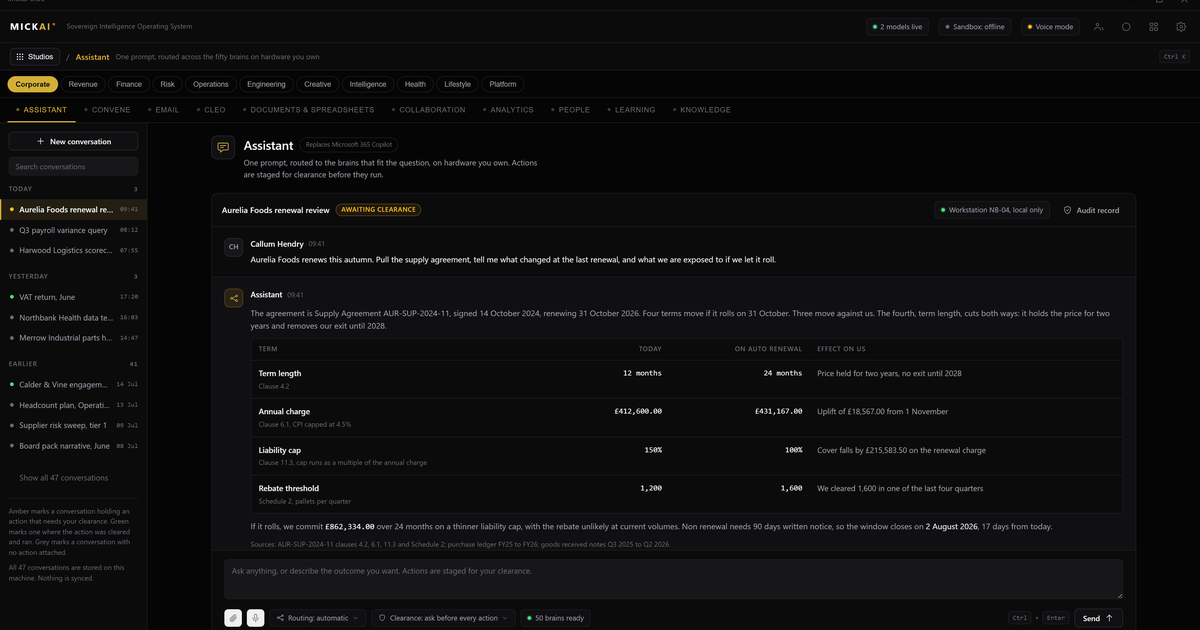
Email, meetings, CRM and team management work together because they are not four products. They are studios on one sovereign operating system, sharing the company's own data store, driven by one assistant that reaches across all of them. A contact in the CRM is the same record the email system reads and the meeting note writes back to, on hardware the customer owns.
That is the whole idea. Most firms run these functions on a stack of disconnected subscriptions. Each one holds its own copy of the data in someone else's cloud, each one charges per user per month, and none of them truly shares a record with the next. We built the alternative: one operating system, one data store, one assistant, no per user cloud bill for the software layer.
The problem with a stack of subscriptions
A typical small or mid-sized firm rents email and documents from one vendor, chat from a second, video meetings from a third, and a CRM from a fourth. Four contracts, four data stores, four logins, four renewal dates.
The data does not move cleanly between them. A customer emails you, a colleague mentions it in chat, a call gets booked in the calendar, and the deal sits in the CRM. Four systems now hold four fragments of the same event, and someone has to stitch them together by hand or pay for another tool that promises to sync them. Integrations break. Exports go stale. The single view of a customer that every business wants is the one thing the stack cannot give you, because no vendor has an interest in handing your full record to a rival's product.
And every seat carries a bill. The prices are public. Take a conservative worked example of a 50 person firm, using published list prices as reported public facts, over 12 months:
- Business email and productivity. Microsoft 365 Business Standard is published at 12.50 US dollars per user per month. 50 users times 12.50 times 12 months is 7,500 US dollars a year.
- Team chat. Slack's Pro plan is published at 8.75 US dollars per user per month. 50 times 8.75 times 12 is 5,250 US dollars a year.
- Video meetings. Zoom's Business plan is published at 18.32 US dollars per user per month. 50 times 18.32 times 12 is 10,992 US dollars a year. Where a plan's price varies by term or seat count, treat this as the method rather than a fixed figure.
- CRM. Salesforce Sales Cloud Professional is published at 80 US dollars per user per month. 50 times 80 times 12 is 48,000 US dollars a year.
On these published list prices, that one firm is renting the software layer for tens of thousands of US dollars every year, and it repeats every year, for software it will never own. The assumption here is simple and stated in the open: 50 users, list price, 12 months, no discounts modelled. The point is not the exact total, which every firm can recompute with its own headcount. The point is that four bills recur forever and the data stays split.
We do not publish MICKAI pricing here. The comparison that matters is structural: renting four cloud products that do not share data, versus owning one operating system that does.
One operating system, four studios
On our platform these functions are studios, not apps. They sit on the same sovereign operating system and read from the same data store.
Our email system handles the company's mail on infrastructure the company owns. Threads, contacts and attachments live in the shared store, so the CRM and the assistant can read them without an export or a connector.
Our meetings and collaboration platform covers team chat and video meetings in one place. A meeting is not a silo. Its notes, actions and attendees write back to the same records the email and CRM studios use, so a decision taken in a call is visible where the work actually happens.
Our CRM holds customers, deals and history as first-class records in the shared store. When a customer emails, the thread is already attached to their record because both studios read the same data. There is no sync job to break.
Our team management covers people, tasks and projects. Because it sits on the same operating system, a task raised in a meeting, an owner named in an email and a deal in the CRM refer to the same underlying records rather than four copies that drift apart.
None of these is a separate purchase from a separate vendor. They are studios switched on within one system.
One assistant across all of them
The assistant is the same across every studio. Ask it to pull every open thread with a customer, summarise the last meeting about their account, and list the tasks owned by your team, and it works across email, meetings, CRM and team management as one surface, because underneath they are one system with one data store.
A stack of subscriptions cannot do this without handing each vendor's data to a middle layer that then holds a fifth copy. Our assistant reads the company's own records in place. It does not need to reconcile four exports because there is only one store to read.
That single reach is the practical benefit customers feel first. The customer view that four subscriptions could never assemble is simply the default, because the data was never split in the first place.
What owning the stack changes
Running these studios on hardware the customer owns changes three things beyond the bill.
The vendor cannot see your data. Private deployment where the vendor cannot see your data is the baseline we start from, not a premium tier. The system is air-gapped by default. Your email, your customer records and your meeting notes do not leave the hardware you own.
Every action is audited. The assistant is powerful because it reaches across studios, so every action it takes is written to the Open Audit Record, an action-level log. You can see which studio was touched, what changed and when. That is a level of accountability a stack of separate clouds cannot offer, because no single one of them sees the whole picture.
You run the whole software stack, not a model you integrate. The value here is not a clever component you bolt onto your existing tools. It is the operating system a company runs on. That is the gap heavyweight vendors leave open for the regulated small and mid-sized firm: the option to own the stack rather than rent four slices of it.
The platform spans 63 studios on this one operating system. Email, meetings, CRM and team management are the core a firm feels every day, and clients onboard onto an initial focused set before switching on more. Because every studio shares the same operating system and data store, adding one later is a switch, not another integration project and another vendor contract.
FAQ
What does it mean that email, meetings, CRM and team management run on one operating system? They are studios on the MICKAI sovereign operating system rather than separate apps. They share the company's own data store and are driven by one assistant, so a contact, a thread or a meeting note is the same record everywhere instead of a copy in each product.
How is this different from buying Microsoft 365, Slack and Salesforce separately? A stack of subscriptions keeps your data in each vendor's cloud, charges per user per month for each product, and does not share records between them. Our studios run on hardware the customer owns, share one data store and carry no per user cloud subscription for the software layer.
Can we start with just email and meetings, then add CRM and team management later? Yes. The platform spans 63 studios and clients onboard onto an initial focused set. Because every studio sits on the same operating system and data store, adding one later means switching it on, not integrating another vendor.
Does the vendor see our data? No. The system is air-gapped by default and runs on hardware the customer owns. Private deployment where the vendor cannot see your data is the baseline we start from, not an add-on.
How do we know what the assistant did across these studios? Every action the assistant takes is written to the Open Audit Record, an action-level log. You can see which studio was touched, what changed and when, across email, meetings, CRM and team management in one place.
Is MICKAI certified to a standard like SOC 2 or ISO 27001? We hold no such certifications and do not claim any. The security posture rests on architecture: air-gapped by default, on hardware you own, with an action-level audit record you control.
Frequently asked questions
What does it mean that email, meetings, CRM and team management run on one operating system?
They are studios on the MICKAI sovereign operating system rather than separate apps. They share the company's own data store and are driven by one assistant, so a contact, a thread or a meeting note is the same record everywhere instead of a copy in each product.
How is this different from buying Microsoft 365, Slack and Salesforce separately?
A stack of subscriptions keeps your data in each vendor's cloud, charges per user per month for each product, and does not share records between them. Our studios run on hardware the customer owns, share one data store and carry no per user cloud subscription for the software layer.
Can we start with just email and meetings, then add CRM and team management later?
Yes. The platform spans 63 studios and clients onboard onto an initial focused set. Because every studio sits on the same operating system and data store, adding one later means switching it on, not integrating another vendor.
Does the vendor see our data?
No. The system is air-gapped by default and runs on hardware the customer owns. Private deployment where the vendor cannot see your data is the baseline we start from, not an add-on.
How do we know what the assistant did across these studios?
Every action the assistant takes is written to the Open Audit Record, an action-level log. You can see which studio was touched, what changed and when, across email, meetings, CRM and team management in one place.
Is MICKAI certified to a standard like SOC 2 or ISO 27001?
We hold no such certifications and do not claim any. The security posture rests on architecture: air-gapped by default, on hardware you own, with an action-level audit record you control.