Note-taking and company knowledge that stays in your building
A note-taking and knowledge studio that captures meetings, documents and institutional memory on hardware you own, with nothing sent to a third party.
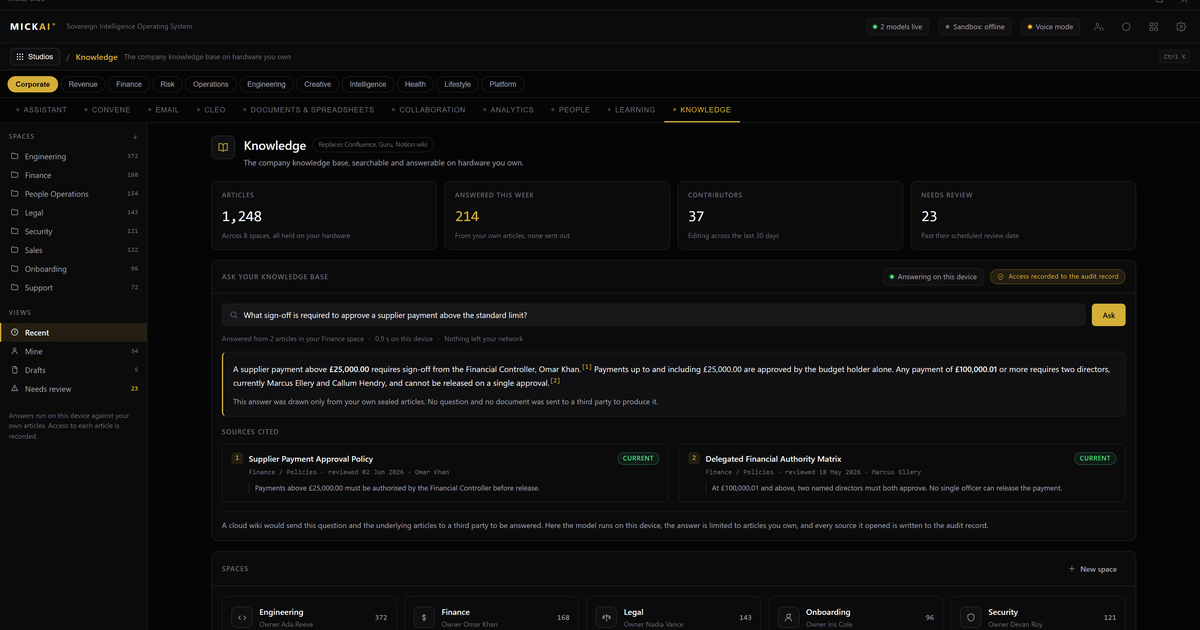
Our note-taking and knowledge studio captures meeting notes, documents and institutional knowledge and organises them with your assistant, and none of it is sent to a third party. It runs on the MICKAI sovereign operating system, on hardware you own, so your company's memory sits inside your own building. For a regulated firm, that is the difference between a knowledge base you control and one that lives on someone else's servers.
What the knowledge studio does
The studio does three plain things well. It takes notes, it holds documents, and it remembers what your company knows.
When a meeting happens, the assistant captures the discussion, produces a clean summary, pulls out decisions and actions, and files them where the right people can find them. When a document is created or received, it is stored, indexed and made searchable. Over months and years, the notes and documents build into a company knowledge base: the reasons behind decisions, the context around a client, the working answer to a question that has come up before.
None of that is novel on its own. Note-taking tools, document stores and wikis have existed for years. What is different here is where it all lives and who can reach it.
Where your knowledge actually lives
With most modern tools, your notes and documents are held on the vendor's infrastructure. You are renting space in their cloud. The vendor can, technically, reach the data. Their staff, their sub-processors and their models sit on the same side of the wall as your knowledge.
Our knowledge studio inverts that. The software runs on the MICKAI sovereign operating system, installed on hardware the customer owns, air-gapped by default. Your meeting transcripts, your documents and your institutional memory are on machines in your building. There is no external tenant, no shared model reading your files, no third party who can technically get to them.
Private deployment where the vendor cannot see your data is the baseline we start from. The knowledge studio goes past it in a way that matters for compliance: every action the assistant takes on your knowledge, every capture, every summary, every retrieval, is written to the Open Audit Record. You do not just get a promise that data stayed put. You get an action-level record you can inspect.
Why this matters for a regulated firm
A regulated firm carries a specific burden. Client files, case notes, deal terms, advice given and the reasoning behind it are all subject to confidentiality duties, data-protection law and, in many sectors, a regulator who can ask what you did and why.
Three things follow from that.
First, data residency is not a preference, it is often a requirement. If your meeting notes about a client sit in a general-purpose cloud, you are relying on contracts and vendor controls to keep them contained. If they sit on your own hardware in your own building, containment is a property of the architecture, not a clause.
Second, confidential discussions should not become training data or leave through a model. When note-taking runs through an external assistant, the content of your meetings can pass through systems you do not control. Our assistant runs locally, on your infrastructure, so the discussion never leaves.
Third, you need to be able to show your work. When a regulator or an auditor asks who accessed a file, or what the assistant did with a set of notes, the Open Audit Record gives you an answer at the level of individual actions rather than a vague assurance.
We hold no certifications, and we do not claim any. We are not asking you to trust a badge. The point of the design is that the data does not leave your building in the first place, which is the control most of those certifications are trying to evidence.
One operating system, one assistant, shared memory
The knowledge studio is not a standalone app. It is one of the studios on the MICKAI sovereign operating system, and it shares the same assistant and the same data as the rest of the platform.
That is what makes the notes worth taking. When a meeting ends, the notes the assistant captured are not stranded in a separate tool. They connect to the meetings and collaboration studio where the meeting was held, to the email system where the follow-ups go out, and to the CRM where the client record lives. Ask the assistant a question and it can reach across all of them, because they run on one operating system over your own data.
The result is a single company memory instead of a dozen silos. A decision made in a meeting, the document that recorded it, and the email that acted on it are all part of the same searchable knowledge base. When someone leaves, that memory stays with the firm. When a new person joins, the context is already there.
The platform spans 63 studios on this one operating system. Clients onboard onto an initial focused set rather than all of it at once, so the knowledge, meetings and email studios can work together from day one without a large rollout.
What you stop renting
It is worth being concrete about the alternative you are replacing. Many firms run note-taking and knowledge on a stack of subscriptions: a documents and collaboration suite, a meeting-notes add-on, a separate wiki or knowledge tool, each billed per user per month.
Take the published list prices as a way to size it. Microsoft 365 Business Standard is listed at 12.50 US dollars per user per month, billed annually, at the time of writing. That is the suite, before any dedicated knowledge or meeting-notes tool on top. For a firm of 200 people, 200 users times 12.50 dollars times 12 months is 30,000 dollars a year for that one layer, and that is a conservative figure because it counts only the base suite and none of the add-ons a knowledge workflow usually pulls in.
We treat that as an illustration of method, not a quoted saving. Prices change, and every firm's stack is different. The structural point holds regardless of the exact number: a subscription stack is a recurring cost that rises with headcount and never converts into something you own. The knowledge studio runs on hardware you own, as part of an operating system you run, rather than a set of seats you rent in perpetuity. We do not publish MICKAI pricing here; the comparison is only to show what the incumbent model costs and where it keeps costing.
Getting started
Onboarding the knowledge studio starts with capture. The assistant begins taking and organising meeting notes and filing documents as work happens, and the company knowledge base builds from there. Because it shares the operating system with meetings and email, connecting those studios extends the same memory across the tools your team already lives in, all on your hardware, all inside your building.
FAQ
Where are our notes and documents stored? On hardware you own, inside your own building or private data centre. The studio runs on the MICKAI sovereign operating system, so notes, transcripts and documents stay on your infrastructure and are not sent to a third party.
Does the assistant read our meeting notes? Yes, but only your local assistant, running on your hardware. It captures, summarises and organises notes without routing anything to an external cloud, and every action is written to the Open Audit Record.
How is this different from a private cloud tenant? A private tenant still runs on the vendor's servers under the vendor's control. Here the software and the data both sit on machines you own, air-gapped by default, so there is no external party who can technically reach your knowledge base.
Can we search across meetings, documents and email together? Yes. Because the knowledge studio shares one operating system and one assistant with the meetings, email and collaboration studios, a single search reaches across all of them using your own data.
Do you hold security certifications? No. We do not claim SOC 2, ISO or Cyber Essentials. The architecture is designed so that data does not leave your building, which is the control most regulated firms are trying to enforce.
What happens to knowledge when someone leaves? It stays. Notes, decisions and documents are captured into the company knowledge base as they happen, so institutional memory belongs to the firm rather than walking out with an individual.
Frequently asked questions
Where are our notes and documents stored?
On hardware you own, inside your own building or private data centre. The note-taking and knowledge studio runs on the MICKAI sovereign operating system, so notes, transcripts and documents stay on your infrastructure and are not sent to a third party.
Does the assistant read our meeting notes?
Yes, but only your local assistant, running on your hardware. It captures, summarises and organises notes without routing anything to an external cloud, and every action it takes is written to the Open Audit Record.
How is this different from a private cloud tenant?
A private tenant still runs on the vendor's servers under the vendor's control. Here the software and the data both sit on machines you own, air-gapped by default, so there is no external party who can technically reach your knowledge base.
Can we search across meetings, documents and email together?
Yes. Because the knowledge studio shares one operating system and one assistant with the meetings, email and collaboration studios, a single search reaches across all of them using your own data.
Do you hold security certifications?
No. We do not claim SOC 2, ISO or Cyber Essentials. The architecture is designed so that data does not leave your building, which is the control most regulated firms are trying to enforce in the first place.
What happens to knowledge when someone leaves?
It stays. Notes, decisions and documents are captured into the company knowledge base as they happen, so institutional memory belongs to the firm rather than walking out with an individual.