Migrating from Google Workspace to a sovereign operating system
A grounded path off Google Workspace: mail, docs, calendars and drives moving to studios on hardware you own, with one assistant across all of it.
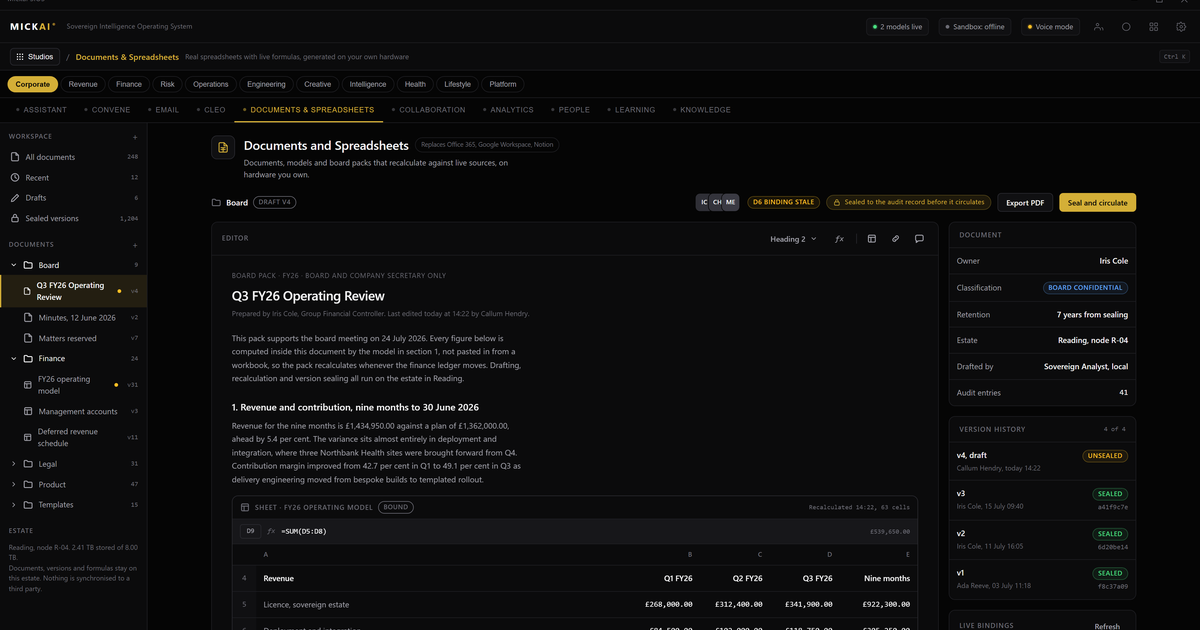
You can leave Google Workspace without losing a day of work. Mail, documents, calendars and drives move onto studios that run on hardware you own, and one assistant works across all of it. What changes is where your data lives and who can reach it. What you gain is ownership.
This is a migration path, not a leap. Below is what moves, how it moves, and what is different once it has.
The starting point
Google Workspace rents you a set of tools that live on Google's machines. Gmail, Docs, Sheets, Slides, Calendar and Drive are good tools. The question is not their quality. The question is where your company's mail and files sit, who else can reach them, and whether you can prove what happened to them.
On Workspace the answer is: on infrastructure you do not own, reachable by a provider you cannot inspect, with an audit trail that shows logins rather than actions. For a firm that has to answer to a regulator, a client or an insurer, that gap matters.
We close it by moving the same work onto your own hardware.
What you move, and what it becomes
The point of moving is not to bolt separate apps together. It is to run the same functions as studios on one sovereign operating system, sharing your own data, with a single assistant across them.
- Gmail becomes our email system. Your addresses, threads, folders and filters come across. The domain stays yours. Delivery keeps working through the move because both systems run in parallel until you cut over.
- Docs, Sheets and Slides become our document, spreadsheet and presentation studios. Files import and stay editable. Sharing and comments carry over. The editors open the formats your team already uses.
- Calendar becomes our calendar studio. Events, invitations and shared calendars move with their attendees and recurrence intact.
- Drive becomes our storage. The folder tree lands as it stands, permissions included, so people find things where they left them.
- Meet and chat become our meetings and messaging studios, so calls and day-to-day conversation stay inside the same operating system rather than a separate account.
Every one of these is a studio on the same operating system. They read the same files, the same directory and the same calendar. There is no fourth-party integration layer to license and no data leaving one vendor to reach another.
How the migration runs
A move like this fails when it is a single overnight switch. We do not run it that way.
First, we stand the operating system up on your hardware and connect it to your domain. Nothing changes for your users yet.
Second, we copy. Mail, files, calendars and drive contents replicate across while everyone keeps working on Google. The originals stay put. During this stage both systems are live.
Third, we cut over by team, not all at once. A department moves, works for a day, confirms everything is where it should be, and the next department follows. If anything is wrong, that team's mail and files are still intact on the Google side.
Fourth, once every team has moved and signed off, you close the Google tenancy. Only then does the rented copy go away, and by then you own the only copy that matters.
Throughout, the assistant helps: it checks that folder counts match, flags mail that failed to copy, and reconciles calendars. You supervise; it does the repetitive reconciliation.
What changes once you have moved
The data is yours. It sits on machines in your building or your rack. It does not leave unless you send it. The system is air-gapped by default, which means the studios, the storage and the assistant all run with no outbound internet requirement. A firm handling client records or regulated data can say, plainly, that its mail and documents never left its own premises.
One assistant works across everything. Because mail, documents and calendars are studios on one operating system rather than separate accounts, the assistant reads across them. Ask it to pull the last quarter's client correspondence into a summary, draft a reply from a document, or find every file touched before a meeting, and it works over your own data inside your own walls. Nothing you ask it is used to train an outside model.
You can prove what happened. Every action a studio or the assistant takes is written to an Open Audit Record. Not a login log, an action log: which item was touched, by whom or what, when, and why. When an auditor or a client asks what was done with their data, you have the record and you can hand it over.
Nobody upstream can reach in. The value here sits beyond private deployment, which is the baseline anyone offering on-premise software should meet. Air-gapped operation and the action-level record mean the guarantee is not only that your data sits on your hardware, but that you can demonstrate nothing reached across it and show exactly what was done inside.
The cost you stop renting
Google Workspace is billed per user per month. Take the published Business Standard list price, reported publicly as 14 US dollars per user per month. The method for your own estimate is simple: users times price times twelve.
For a 200-person firm that is 200 times 14 times 12, which is 33,600 US dollars a year, every year, rented and recurring. A 50-person firm on the same plan is 8,400 US dollars a year. Those are conservative, list-price figures for one product; a company also paying for a separate CRM, a messaging tool and a meetings platform is renting several such lines at once.
We are not going to quote you a MICKAI price here. The point of the comparison is the shape of the spend: Workspace is a bill that never ends and grows with headcount. Owning the operating system moves the software onto hardware you already need and turns a permanent rental into a fixed asset. Run the users-times-price-times-twelve sum for every rented tool you hold and you have the recurring number you stop paying.
What is behind the studios
The studios share one operating system, one directory and one store of your data. That is the whole software stack, not a model you have to wire into your own systems. Our position rests on 104 filed UK patent applications carrying 2,340 claims, and on 63 studios on that single sovereign operating system. The reasoning layer that drives the assistant reads across your mail, files and calendars to do the work you ask, and it does so entirely on your hardware.
We hold no certifications and claim none. What we offer is the record and the boundary: the action-level Open Audit Record, and a system that is air-gapped by default so the boundary is real rather than promised. You inspect both.
Who this is for
We built this for the regulated small and mid-sized firm. The kind of company that has to answer for its data to a regulator, a client or an insurer, and cannot do that honestly from a cloud tenancy it is not allowed to inspect. If that is you, the migration above is the path off Workspace and onto software you own.
The tools stay familiar. The work carries on. What moves is the ground it all stands on, from a provider's machines to yours.
FAQ
Do we have to move everything at once? No. We run our email system, documents, calendars and drives in parallel with Google Workspace while data moves across. You cut over one team at a time and keep working throughout. Nothing is deleted on the Google side until you confirm the move is complete.
What happens to our existing Google files and formats? Documents, sheets and slides import into our editors and stay editable. Mail arrives with folders and threads intact. Drive contents land in our storage with the same folder structure. We keep the originals until you sign off, so a rollback is always possible during the move.
Where does the data actually live afterwards? On hardware you own, in your building or your rack. The studios run on one sovereign operating system on that hardware. Nothing leaves the box unless you send it. The system is air-gapped by default, so mail, files and the assistant all run with no outbound internet requirement.
Does the assistant see our mail and files? Only inside your walls. The assistant runs on the same owned hardware as the studios and reads across mail, documents and calendars to do work you ask of it. None of that content is used to train an outside model and none of it leaves your machines.
How do we know what the system did? Every action the assistant or a studio takes is written to an Open Audit Record: who or what acted, on which item, when, and why. It is action-level, not a login log. You can read it, export it, and hand it to an auditor.
Is this only for large companies? No. We built it for the regulated small and mid-sized firm that has to answer for its data but does not want a cloud tenancy it cannot inspect. The studios cover the same ground as Workspace, so a team of thirty runs on it as readily as a team of three hundred.
Frequently asked questions
Do we have to move everything at once?
No. We run our email system, documents, calendars and drives in parallel with Google Workspace while data moves across. You cut over one team at a time and keep working throughout. Nothing is deleted on the Google side until you confirm the move is complete.
What happens to our existing Google files and formats?
Documents, sheets and slides import into our editors and stay editable. Mail arrives with folders and threads intact. Drive contents land in our storage with the same folder structure. We keep the originals until you sign off, so a rollback is always possible during the move.
Where does the data actually live afterwards?
On hardware you own, in your building or your rack. The studios run on one sovereign operating system on that hardware. Nothing leaves the box unless you send it. The system is air-gapped by default, so mail, files and the assistant all run with no outbound internet requirement.
Does the assistant see our mail and files?
Only inside your walls. The assistant runs on the same owned hardware as the studios and reads across mail, documents and calendars to do work you ask of it. None of that content is used to train an outside model and none of it leaves your machines.
How do we know what the system did?
Every action the assistant or a studio takes is written to an Open Audit Record: who or what acted, on which item, when, and why. It is action-level, not a login log. You can read it, export it, and hand it to an auditor.
Is this only for large companies?
No. We built it for the regulated small and mid-sized firm that has to answer for its data but does not want a cloud tenancy it cannot inspect. The studios cover the same ground as Workspace, so a team of thirty runs on it as readily as a team of three hundred.