How the MICKAI operating system runs the whole company
One sovereign operating system with 63 studios covering email, meetings, chat, CRM, finance, legal, HR and compliance, on hardware you own.
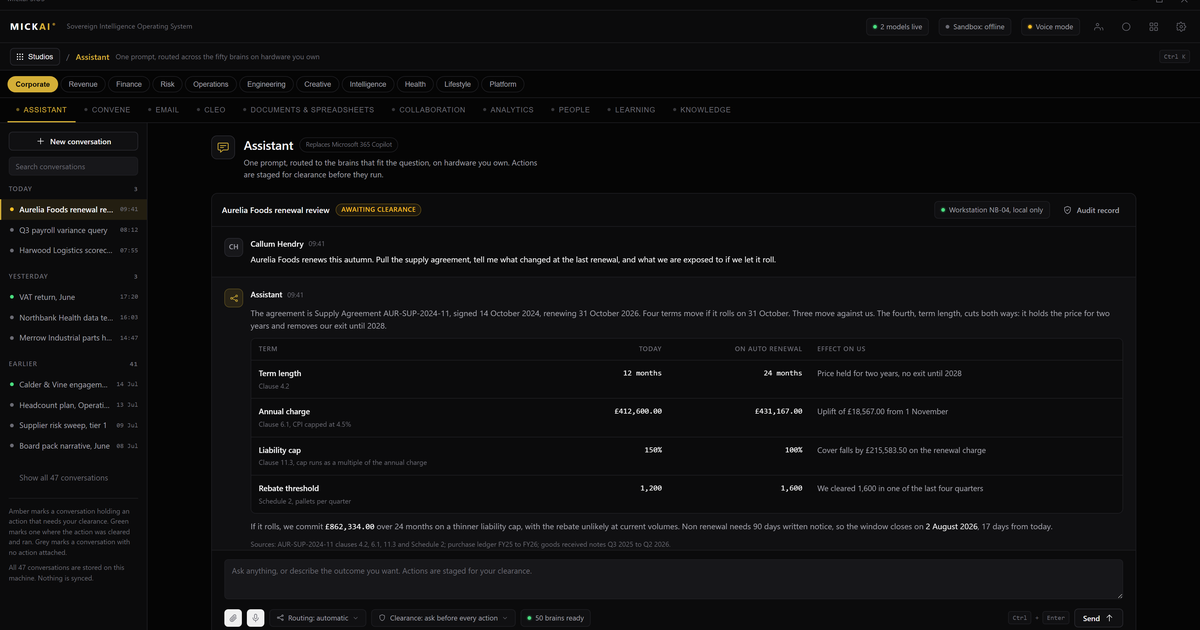
How the MICKAI operating system runs the whole company
A company can run on one operating system instead of a dozen separate subscriptions. The MICKAI platform spans 63 studios on a single sovereign operating system, covering email, meetings, chat, CRM, team management, finance, legal, HR and compliance, with one assistant across all of it. It runs on hardware the company owns, so the software stack that a business depends on is not rented from anyone.
That is the whole thesis. Most firms buy their email from one vendor, their chat from another, their CRM from a third, their meetings from a fourth, and then pay again to make those tools talk to each other. We collapse that into one operating system where the tools already share the same data.
One operating system, not a shelf of apps
The important word is operating system. These studios are not separate products bundled under a brand. They are built on one platform, one data layer and one security model. When the sales team logs a call in the CRM studio, the finance studio and the assistant see the same record without an export, an integration or a nightly sync.
That matters because integration is where most software estates leak money and time. Every connector between two rented tools is a place where data is copied, permissions drift and something breaks after an update. Owning the operating system removes the connector problem: there is nothing to integrate, because it was never split apart.
Clients do not switch everything on at once. A firm onboards onto a focused initial set of studios that matches how it actually works, then extends across the rest as it needs them. The point is that the extension does not mean buying and wiring a new vendor. It means turning on another studio that already shares the company's data.
What the studios cover
The 63 studios span the functions a company runs day to day. In plain terms:
- Email. Our email system, running on the company's own infrastructure rather than a hosted mailbox.
- Meetings and collaboration. Our meetings and collaboration platform for calls, rooms and shared work, an alternative to the usual video and chat subscriptions.
- Chat. Team messaging that sits on the same operating system as everything else, so a conversation can reference a customer record or a document without leaving the tool.
- CRM. Our CRM for pipeline, contacts and accounts, working from the same data the rest of the company uses.
- Team management. Our team management for people, tasks and workload.
- Finance. Studios for the numbers a business tracks and reports.
- Legal. Studios for the documents and matters a company handles.
- HR. Studios for the employee lifecycle.
- Compliance. Studios that keep a record of what happened and who did it.
That is a sample, not the full list. The through-line is that each of these is a studio on the same operating system, not a standalone app you license and then connect.
One assistant across everything
Because the studios share one operating system and one data layer, a single assistant works across all of them. It reads an email thread, checks the related CRM record, drafts the follow-up, and books the meeting, without being locked inside any one app.
This is the practical difference between one operating system and a shelf of subscriptions. A rented assistant inside a rented email tool can only see the email tool. An assistant that lives on the operating system sees the whole company, within the permissions it is given, and acts across it. One assistant, every studio, the company's own data.
The money: owning versus renting
The commercial case is straightforward. Most business software is priced per user per month, and it recurs forever. Consider the published list prices of the incumbents as reported public facts.
Microsoft 365 Business Standard is published at 12.50 US dollars per user per month on an annual commitment. Take a conservative worked example of 200 users. That is 200 times 12.50 times 12, which is 30,000 US dollars a year, for one productivity suite, every year, with no end.
Now layer on the tools that suite does not fully replace. Slack's published Pro plan is 8.75 US dollars per user per month billed annually. For 200 users that is 200 times 8.75 times 12, which is 21,000 US dollars a year. Salesforce's published Enterprise CRM edition is 165 US dollars per user per month billed annually; even at 40 sales users that is 40 times 165 times 12, which is 79,200 US dollars a year. These are three line items among many, and they never stop.
We are stating the method and the published assumptions, not a precise total for any one firm, because the real number depends on headcount and mix. The pattern holds regardless: a mid-sized company rents the same functions year after year and owns none of it at the end.
On the MICKAI operating system, those functions are studios the company runs on hardware it owns. We do not publish our pricing here, and the point of this piece is not a headline figure. The point is the shape of the deal: the incumbent model is a permanent per-seat rent for software you never own, and the sovereign model replaces it with a stack you run yourself.
Where private deployment is only the starting point
Running software on infrastructure the vendor cannot see is the baseline we start from, not the whole pitch. Several serious vendors offer private or on-premises deployment. We treat that as table stakes and build past it.
Three things sit beyond the baseline. First, an action-level audit trail. The Open Audit Record captures what the system did at the level of individual actions, not just who logged in, which is what a regulated firm actually needs to answer for. Second, air-gapped by default. The operating system is designed to run without reaching the outside world, rather than being connected and then locked down after the fact. Third, it is the software stack a company runs on, not a model to integrate. A business does not have to graft us onto an existing estate; the estate is the studios.
We are candid about what we do not have. We hold no certifications and we do not claim any. The controls we point to are architectural: private by construction, air-gapped by default, and audited at the action level. Those are properties of how the system is built, not badges on a wall.
Who this is built for
The heavyweight vendors chase the largest enterprises and the smallest self-serve accounts. The regulated small and mid-sized firm sits in between, carrying real compliance obligations without the budget or the team to run a bespoke platform. That firm is who the operating system is built for: it gets the breadth of a full software estate on hardware it owns, with an audit record it can hand to a regulator, without assembling a dozen vendors itself.
The engineering behind the platform is protected by 104 filed UK patent applications covering 2,340 claims across 13 families. Those are filed applications, not granted patents, and they are the backdrop to the product rather than the reason to buy it. The reason to buy it is simpler: one operating system, 63 studios, one assistant, and a company that owns the stack it runs on.
Frequently asked questions
What is the MICKAI operating system? It is one sovereign operating system that runs a company's software as a set of studios, from email and meetings to CRM, finance, HR and compliance, with a single assistant across all of them. It runs on hardware the company owns and the vendor cannot see the data.
How many studios does the platform have? The platform spans 63 studios on one operating system. Clients onboard onto a focused initial set that matches their work, then extend across the rest as they need them.
How is this different from Microsoft 365 or Google Workspace? Those are rented cloud suites where the vendor operates the infrastructure and can, in principle, see the data. Our studios run on hardware the company owns, air-gapped by default, with an action-level audit record, and cover far more of the stack than a productivity suite.
Does everything share the same data? Yes. The studios are not separate apps stitched together. They sit on one operating system and one data layer, so the CRM, the finance studio and the assistant all work from the same records.
Do you publish certifications? No. We hold no certifications and do not claim any. Our controls are the architecture itself: private deployment, air-gapping by default, and an action-level audit trail.
Can one assistant really work across all the studios? Yes. Because the studios share one operating system and one data layer, a single assistant reads and acts across email, meetings, CRM, finance and the rest, rather than being locked inside one app.
Frequently asked questions
What is the MICKAI operating system?
It is one sovereign operating system that runs a company's software as a set of studios, from email and meetings to CRM, finance, HR and compliance, with a single assistant across all of them. It runs on hardware the company owns and the vendor cannot see the data.
How many studios does the platform have?
The platform spans 63 studios on one operating system. Clients onboard onto a focused initial set that matches their work, then extend across the rest as they need them.
How is this different from Microsoft 365 or Google Workspace?
Those are rented cloud suites where the vendor operates the infrastructure and can, in principle, see the data. Our studios run on hardware the company owns, air-gapped by default, with an action-level audit record, and cover far more of the stack than a productivity suite.
Does everything share the same data?
Yes. The studios are not separate apps stitched together. They sit on one operating system and one data layer, so the CRM, the finance studio and the assistant all work from the same records.
Do you publish certifications?
No. We hold no certifications and do not claim any. Our controls are the architecture itself: private deployment, air-gapping by default, and an action-level audit trail.
Can one assistant really work across all the studios?
Yes. Because the studios share one operating system and one data layer, a single assistant reads and acts across email, meetings, CRM, finance and the rest, rather than being locked inside one app.