Expenses and reimbursements you control
Our expenses studio runs on hardware you own, wired to finance and payroll. Compare it to Expensify list pricing with a conservative worked example.
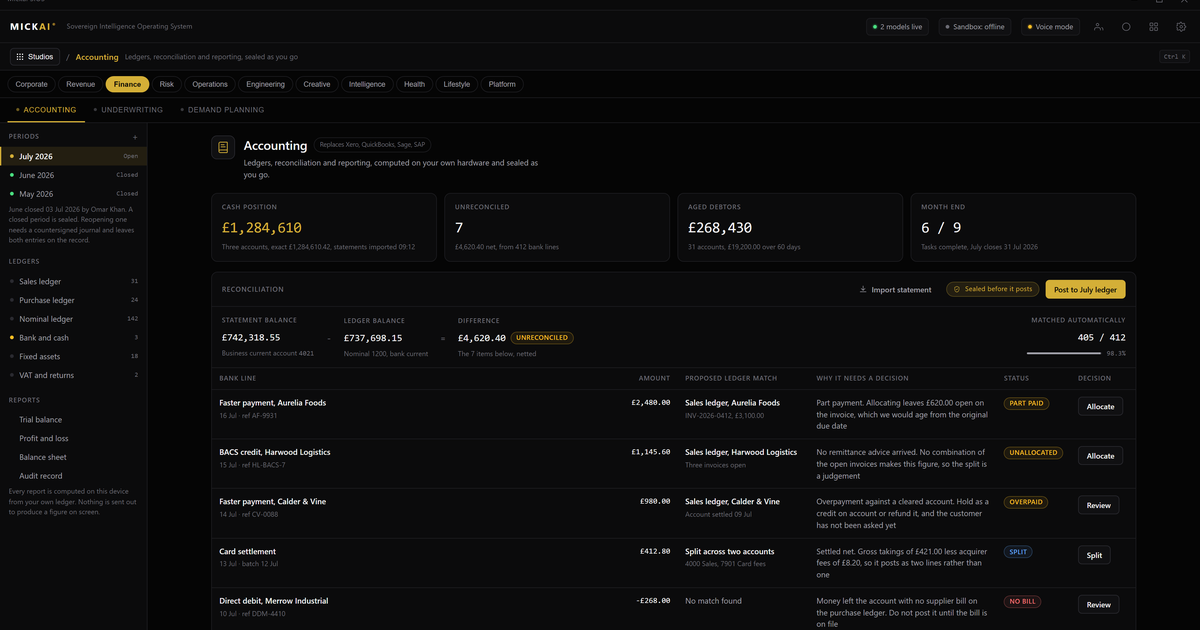
Your expenses tool should not hold your receipts on someone else's servers. Our expenses studio runs on hardware you own, keeps every receipt and claim inside your building, and posts straight into your own finance and payroll. You stop renting the workflow and start owning it.
The claim, start to finish, on your own machines
Someone takes a client to lunch, buys a train ticket, fills the van. They photograph the receipt. The assistant reads it, pulls the merchant, date, amount and tax, and drafts the claim. The employee confirms, a manager approves, and the amount is ready to reimburse. Standard so far.
The difference is where all of that happens. The photograph, the extracted figures, the approval trail and the bank detail for the payout sit on storage you own, in a building you control. The studio runs air-gapped by default. Nothing is shipped to a vendor to be processed and handed back. Expenses are some of the most revealing data a company holds. They show who met whom, who travelled where, what a project actually cost before it was dressed up. That belongs to you.
One operating system, not five subscriptions
Most companies run expenses as an island. A subscription tool captures the receipt, then someone exports a file, imports it into the accounting package, and keys the reimbursement into payroll by hand. Three systems, two exports, and a copy of your finance data sitting with each vendor.
Our expenses studio is not a separate app. It is a studio on the MICKAI sovereign operating system, the same operating system that runs our finance system and our payroll system. They share one store of the company's own data. An approved claim posts to the ledger with the right code against the right project, and where you choose it flows into the next pay run as a reimbursement to the right person. No export file. No overnight sync. No connector to break at quarter end.
That is the pattern across the whole platform. There are 63 studios on this one operating system, and one assistant works across all of them. The assistant that reads a receipt is the same assistant that can tell you what this quarter's travel spend looks like against last, because it is looking at one set of books, not stitching together three.
The cost of renting, worked out plainly
Take expenses on its own. Expensify publishes its list prices per user per month. As reported public figures at the time of writing, the Collect plan is listed at 5 US dollars per user per month on annual billing, and the Control plan at 9 US dollars per user per month on annual billing. Treat those as the incumbent's own published numbers.
Now the method, which matters more than any single figure. Take your headcount, multiply by the per user per month price, multiply by twelve. That is your annual bill, and it recurs every year for as long as you subscribe.
A conservative worked example, on the assumption of 120 people on the Control plan at the listed 9 dollars per user per month:
120 users times 9 dollars times 12 months equals 12,960 US dollars per year.
On the Collect plan at the listed 5 dollars per user per month:
120 users times 5 dollars times 12 months equals 7,200 US dollars per year.
If a price has changed since publication, do the same arithmetic with the current published number. The shape does not change. It is a figure that leaves the company every year and buys you nothing you keep. Grow to 300 people and the same Control plan sum is 300 times 9 times 12, which is 32,400 dollars a year, every year. And this is one tool. The same per seat maths runs underneath the mail, the meetings, the CRM and the rest of the stack a company rents.
We do not publish a MICKAI price in an article. The argument here is structural. A subscription is rent. Owned software on hardware you already run is not.
Approvals, audit and the record you hold
Reimbursement is where money leaves the business, so the controls have to be real. You set the policy: limits per category, receipts required above a threshold, second approval over a figure, mileage at your rate. The studio enforces it as claims come in and flags the ones that break a rule instead of waving them through.
Every action writes to an Open Audit Record at the action level. Not a vague monthly log, but who submitted the claim, who approved it, who changed an amount and when. When a finance lead or an auditor asks how a payment was authorised, the answer is already sitting in a record you hold on your own hardware. You are not raising a ticket with a supplier to get your own history back.
That action-level record is deliberately beyond what a private cloud deployment gives you. Running someone else's software in your own tenancy still leaves the workflow, and often the model, in their hands. Here the whole software stack is yours, air-gapped by default, and the audit is written where you can reach it.
The assistant does the dull part
Reading receipts, matching them to card lines, catching the duplicate someone claimed twice, chasing the missing VAT number: this is the work people put off and the work that leaks money. The assistant does it. It reads the photographed receipt on your hardware, drafts the claim, matches it against the card feed you have already brought into finance, and surfaces the odd ones for a human to decide.
It is the same assistant across every studio, so a question like "what did we spend on travel for that project" is answered from the same books that hold the claims, not from a report you have to build. We do not name the model underneath it. What matters is what it does for the studios and that it does it inside your building, on data that never leaves.
What you actually get
A working expenses and reimbursements studio that captures receipts, enforces your policy, and pays people back through your own payroll. It sits on the MICKAI sovereign operating system next to finance and payroll, sharing one store of your data. It keeps every receipt and claim on hardware you own. It writes an action-level Open Audit Record you hold. And it does not bill you per seat, per month, forever.
We hold 104 filed UK patent applications carrying 2,340 claims across this operating system and the studios on it. They are filed, and they sit behind the product. The reason to own your expenses is simpler than any of that. The receipts, the amounts and the people they name are yours. Keep them in the building.
FAQ
Where do receipts and claim data live? On hardware you own, inside your building. Photographs of receipts, card statements, mileage and claim notes stay on your own storage. Nothing is copied to a vendor cloud to be processed, and the studio runs air-gapped by default.
How does it connect to finance and payroll? The expenses studio sits on the same sovereign operating system as our finance system and our payroll system. An approved claim posts to the ledger and, where you choose, flows into the next pay run as a reimbursement. No exports, no connectors, no third party in the middle.
How does this compare to Expensify on cost? Expensify publishes per user per month list prices. Multiply your headcount by that price by twelve to get an annual figure that recurs every year. We do not publish a price here. The point is that a subscription is rent you pay forever, and owned software on owned hardware is not.
Can we see who changed a claim? Yes. Every action on a claim writes to an Open Audit Record at the action level: who submitted, who approved, who edited an amount and when. It is a record you hold, not a log you have to request from a supplier.
Does the assistant read receipts? The assistant reads a photographed receipt, pulls out the merchant, date, amount and tax, and drafts the claim for a person to confirm. It runs on your hardware. We do not name the model behind it, and no receipt leaves the building to be read.
Is this only for large companies? No. We build for the regulated small and mid-sized firm that has to prove where its data is and who touched it, and that is tired of paying per seat for tools it does not own.
Frequently asked questions
Where do receipts and claim data live?
On hardware you own, inside your building. Photographs of receipts, card statements, mileage and claim notes stay on your own storage. Nothing is copied to a vendor cloud to be processed, and the studio runs air-gapped by default.
How does it connect to finance and payroll?
The expenses studio sits on the same sovereign operating system as our finance system and our payroll system. An approved claim posts to the ledger and, where you choose, flows into the next pay run as a reimbursement. No exports, no connectors, no third party in the middle.
How does this compare to Expensify on cost?
Expensify publishes per user per month list prices. Multiply your headcount by that price by twelve to get an annual figure that recurs every year. We do not publish a price here. The point is that a subscription is rent you pay forever, and owned software on owned hardware is not.
Can we see who changed a claim?
Yes. Every action on a claim writes to an Open Audit Record at the action level: who submitted, who approved, who edited an amount and when. It is a record you hold, not a log you have to request from a supplier.
Does the assistant read receipts?
The assistant reads a photographed receipt, pulls out the merchant, date, amount and tax, and drafts the claim for a person to confirm. It runs on your hardware. We do not name the model behind it, and no receipt leaves the building to be read.
Is this only for large companies?
No. We build for the regulated small and mid-sized firm that has to prove where its data is and who touched it, and that is tired of paying per seat for tools it does not own.