Document and file collaboration you own
Shared editing and file storage on your own hardware. A documents studio that keeps data in the building and feeds one assistant across the platform.
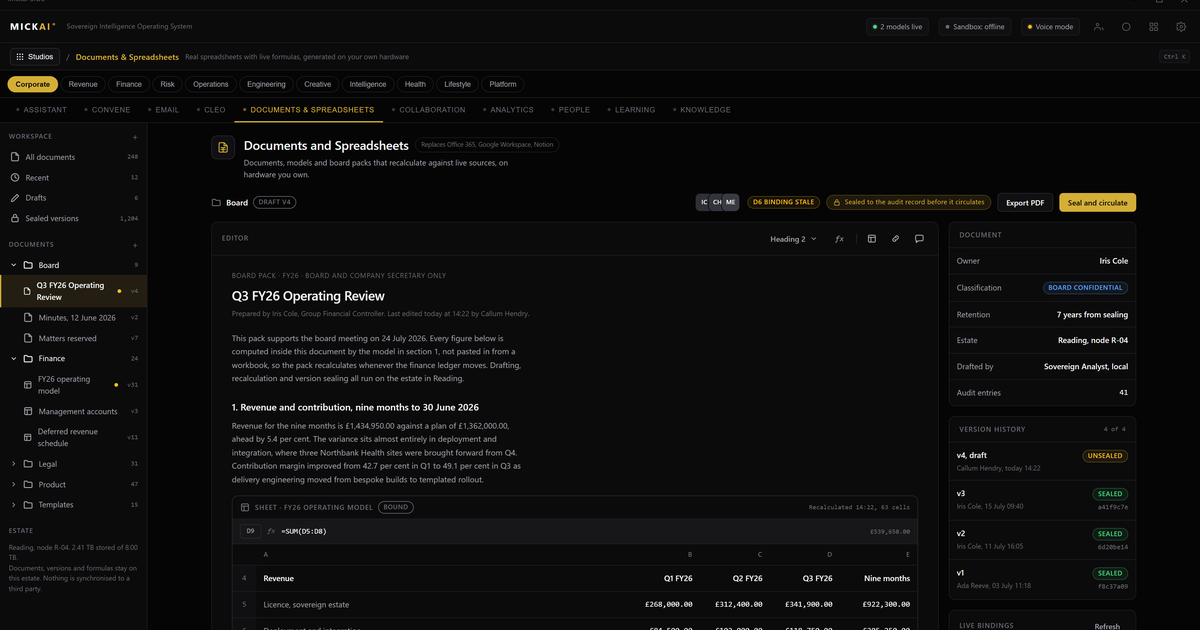
Yes, you can own your document and file collaboration outright. Our documents and files studio gives your team shared editing, versioning and storage on hardware you own, inside your own building, as an alternative to Google Workspace and SharePoint. The files never leave your infrastructure, and the same data feeds one assistant that works across the whole platform.
This is the practical version of data sovereignty. Not a policy statement. A place your people write proposals, keep contracts, share spreadsheets and find last quarter's board pack, where the storage underneath belongs to you and no outside vendor holds a copy.
What the documents and files studio does
It is the everyday workspace your team already knows how to use. Shared documents that several people edit at once. A file store with folders, permissions and search. Version history so you can see who changed what and roll back. Comments and review. The parts of Google Docs, Google Drive and SharePoint that people actually touch every day.
The difference is underneath. Every document, every file, every version sits on storage you own. When someone opens a contract, the bytes come off your disks. When two people co-edit a proposal, the merge happens on your machine. Nothing is round tripped through a vendor cloud, and there is no external account that can be locked, priced up or subpoenaed out from under you.
It is not a separate app you bolt on. It is one studio among the 63 studios that make up the MICKAI sovereign operating system. Clients onboard onto an initial focused set of studios rather than all of them at once, and documents and files is one of the first most firms want, because it is where the working day lives.
The data stays in the building, and it feeds the assistant
The reason to keep files on your own hardware is not only privacy, although that matters in a regulated firm. It is that your documents become useful in a way rented tools cannot match.
Because the documents studio and the assistant run on the same operating system, sharing the same storage, the assistant can read across your files without anything leaving the building. Ask it to find every termination clause across your supplier contracts. Ask it to draft a reply from the last three emails and the linked spec. Ask it to summarise the folder before a meeting. It answers from your own material, and the material never travels to an outside server to make that possible.
With Google Workspace or Microsoft 365, any assistant feature that reads your documents is reading them in the vendor's cloud, under the vendor's terms. With our platform, the assistant sits inside your walls. Air gapped by default. That is the baseline we start from, and the value is above it: every action the assistant takes on your files is written to the Open Audit Record, so you can see, at the level of an individual action, what was read and what was produced.
What it replaces, and the cost of renting it
Most firms today pay a per user, per month subscription to Google or Microsoft for exactly these features, and they pay it every month, forever, whether or not the headcount is using every part of the suite.
Take the published list prices as reported public facts. Google Workspace Business Standard is listed at 12 US dollars per user per month. Microsoft 365 Business Standard is listed at 12.50 US dollars per user per month, and SharePoint sold on its own is listed at 5 US dollars per user per month. These are the incumbents' own headline numbers.
Build a conservative worked example. Assume a firm of 100 people on Google Workspace Business Standard at the listed 12 dollars per user per month. The assumption is 100 users, the published price, and 12 months:
100 users times 12 dollars times 12 months equals 14,400 US dollars per year.
On Microsoft 365 Business Standard at the listed 12.50 dollars, the same 100 person firm on the same assumption:
100 users times 12.50 dollars times 12 months equals 15,000 US dollars per year.
Those figures are only the collaboration suite. They recur every year, and they rise as you add people. Over five years the Google example on a flat headcount reaches 72,000 dollars, and the Microsoft example reaches 75,000 dollars, before any price increase and before you count the add ons most firms end up buying.
We do not publish our pricing, and this is not a like for like line item comparison. The point is structural. In the rented model the meter never stops and the asset is never yours. In the owned model the collaboration stack runs on hardware you bought once, and the data it holds is an asset on your side of the wall, not the vendor's.
Why owning it beats renting it
Three things change when the documents studio runs on your hardware instead of someone else's cloud.
Your files stop being someone else's business. When collaboration lives in a vendor cloud, the vendor sets the terms, the price and the retention. Your working documents are leverage for their subscription. When it runs on your own operating system, your documents are simply yours.
The subscription meter stops climbing with headcount. Rented per user pricing means every hire is a permanent addition to a recurring bill you never stop paying. Owning the stack breaks that link.
Your documents get an assistant that never phones home. Rented suites are adding assistants that read your content in their cloud. Ours reads your content in your building, writes every action to an audit record you can inspect, and never sends your files out to an external model.
Built for the regulated firm the big vendors overlook
The heavyweight vendors optimise for scale and for their own cloud. The regulated small and mid sized firm, the one that has to keep client data in the building but does not run a large IT function, is left to rent tools that were never designed to keep data on the customer's side.
That firm is who we built for. The documents and files studio installs as part of the MICKAI operating system on hardware you own. It gives your team the collaboration they already understand, keeps every file where your regulator and your clients expect it, and connects it to one assistant that spans the whole platform. Not a model you have to integrate. The software your business runs on.
Frequently asked questions
Where are our documents and files stored? On hardware you own, inside your own building or your own rack. The documents studio writes to your storage. There is no vendor cloud in the path, and no third party with a key to your files.
How is this different from Google Workspace or SharePoint? Those are rented. You pay per user every month and your files sit on the vendor's servers. Our documents studio is a studio on an operating system you run on your own hardware, so the data stays with you and there is no per user cloud subscription funding someone else.
Can several people edit the same document at once? Yes. Shared editing, versions, comments and folders work the way people expect. The difference is that the edits and the file history never leave your infrastructure.
Does the assistant read our files? Only inside your walls. The assistant runs on the same operating system and can search, summarise and draft from your documents, but nothing is sent out to train an external model or reach an outside server.
What does it cost? We do not publish pricing. What we can say is that you are not paying a per user cloud fee that scales with headcount forever. You own the hardware and the software stack.
Is this only for large companies? No. We built it for regulated small and mid sized firms that need their data in the building but do not have a large IT department. It runs on hardware you own and one assistant spans the whole platform.
Frequently asked questions
Where are our documents and files stored?
On hardware you own, inside your own building or your own rack. The documents studio writes to your storage. There is no vendor cloud in the path, and no third party with a key to your files.
How is this different from Google Workspace or SharePoint?
Those are rented. You pay per user every month and your files sit on the vendor's servers. Our documents studio is a studio on an operating system you run on your own hardware, so the data stays with you and there is no per user cloud subscription funding someone else.
Can several people edit the same document at once?
Yes. Shared editing, versions, comments and folders work the way people expect. The difference is that the edits and the file history never leave your infrastructure.
Does the assistant read our files?
Only inside your walls. The assistant runs on the same operating system and can search, summarise and draft from your documents, but nothing is sent out to train an external model or reach an outside server.
What does it cost?
We do not publish pricing. What we can say is that you are not paying a per user cloud fee that scales with headcount forever. You own the hardware and the software stack.
Is this only for large companies?
No. We built it for regulated small and mid sized firms that need their data in the building but do not have a large IT department. It runs on hardware you own and one assistant spans the whole platform.