Analytics on your own data, in your own building
Reporting and analysis over your own data, on hardware you own, with one assistant across every studio. Analytics that never leave the building.
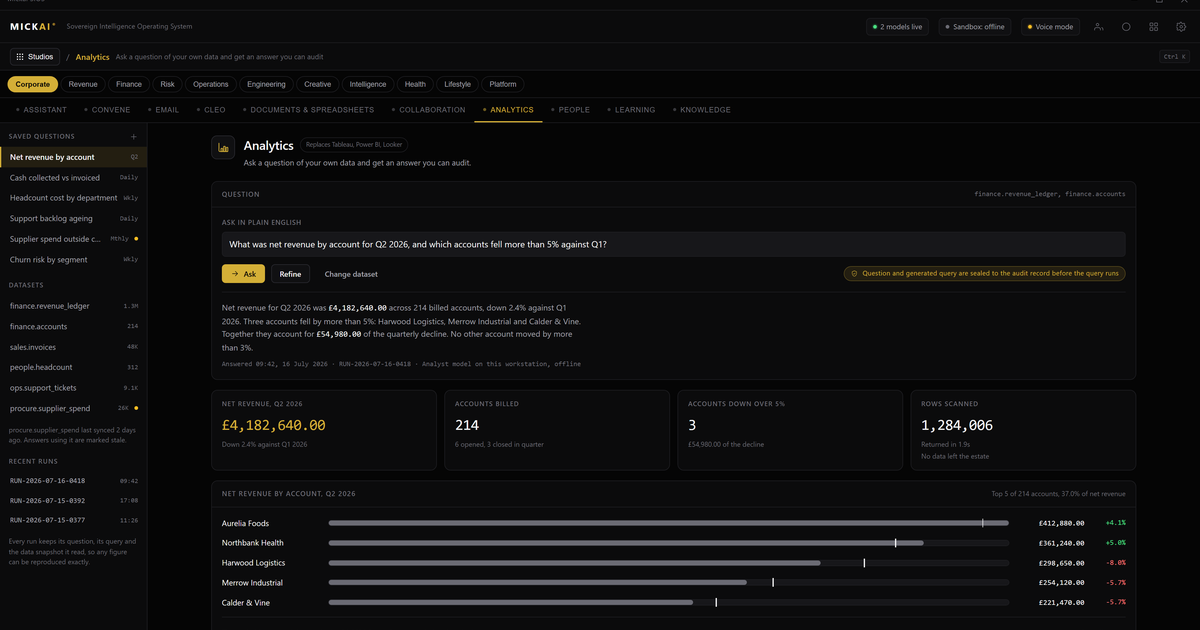
Analytics on MICKAI runs over your own data, on hardware you own, inside your own building. The analytics studio reports on and analyses the information your business already holds, and it draws that information from the other studios on the same operating system rather than from a separate cloud warehouse. Nothing is copied out to a vendor to be processed. The numbers stay where they are made.
That is the whole point. Most analytics products work by moving your data to them. You export, you upload, you connect a pipe, and your operating figures end up sitting in someone else's environment so their engine can read them. We invert that. The data stays in your store and the analysis comes to it.
What the analytics studio does
The analytics studio is reporting and analysis over the company's own records. You get dashboards, tables, trends and breakdowns across sales, operations, finance, support and whatever else your firm tracks. You get scheduled reports that land on a Monday morning. You get one-off questions answered on demand.
The difference is where the work happens. The queries run on your hardware. The charts are built on your hardware. The models that spot a trend or flag an outlier run on your hardware. There is no round trip to a vendor cloud, because the studio and the data are in the same building on the same machines.
You ask a question in plain language. "What did we bill last quarter by region." "Which accounts slipped in the last thirty days." "Show me support volume against headcount for the year." The assistant builds the query against your own data, returns the answer and shows how it got there. You are not writing SQL and you are not waiting on a data team.
Where the numbers come from
An analytics studio is only as good as the data it can reach. This is where running everything on one operating system pays off.
Your email system holds correspondence and the record of what was agreed. Your meetings and collaboration platform holds decisions and notes. Your CRM holds the pipeline, the accounts and the deal history. Your team management holds who did what and when. Your document store holds contracts and reports. On most stacks these live in separate products from separate vendors, each with its own copy of a slice of the truth, and getting a single view means stitching exports together and hoping the join is clean.
On MICKAI they are studios on one operating system, sharing one data layer that the company owns. The analytics studio reads across them directly. A question about revenue per account can pull the deal value from the CRM and the delivery effort from team management and the support load from the helpdesk records without a single export, because they are all sat in the same store. The assistant is the same assistant across every studio, so it already understands the shape of your data.
That shared foundation is why analytics here is not a bolt-on. It is a view onto the work the rest of the business is already doing.
Why keeping analytics in-house matters
Your operating figures are among the most sensitive things you own. Margins, customer concentration, churn, pay, pipeline. When you run analytics in a cloud BI tool, that entire picture is assembled inside a vendor's environment. You are trusting them not to look, and you are trusting that the connection between you and them is never the weak point.
Private deployment where the vendor cannot see your data is the baseline we start from. We go past it. The analytics studio is air-gapped by default, so the analysis of your most revealing numbers happens on machines that are not reaching out to anyone. There is no vendor with a copy. There is no telemetry describing what you asked. The record of every query and every report is written to the Open Audit Record on your own system, so you can see exactly what was run, by whom, against what, at the level of the action rather than a vague access log.
For a regulated firm this is the difference between hoping you can answer a question from your auditor and being able to show them the record. And it means your competitive picture, the thing that would be most valuable to a rival or an attacker, never sits in a shared cloud in the first place.
The cost of renting analytics
Cloud business intelligence is sold per user per month, and the published prices add up. Take a mid-market seat on a mainstream BI product at a commonly listed 20 US dollars per user per month. For a firm putting 50 people in front of dashboards, that is 50 times 20 times 12, which is 12,000 US dollars a year, every year, for the licences alone. Scale it to 200 users and the same arithmetic gives 48,000 US dollars a year. These figures use the vendor's own published list price and a flat headcount assumption stated here so you can check it; your real number depends on your seat count and tier.
That is a recurring rent for the right to analyse data you already own. It rises with your headcount and it never stops. And it usually sits on top of the separate per-seat bills for the email, the meetings, the CRM and the file storage that feed it, each from a different vendor, each with its own annual increase.
We do not publish our pricing, and this piece is not a price comparison of us against them. The point is structural. When the analytics studio is part of an operating system you run on hardware you own, you are not paying a per-seat rent to look at your own figures, and adding the fifty-first analyst does not add a fifty-first licence.
One assistant, one operating system
The assistant in the analytics studio is the same assistant you use everywhere else on the platform. Ask it in the CRM why a region is soft and it can pull the analytics view without you switching tools. Ask it in the analytics studio what changed in an account and it can reach into the CRM history. It is not a chatbot bolted onto a dashboard. It is the operating system's assistant, and analytics is one of the things it can do because it can see, with your permission and on your hardware, the data the other studios hold.
This is the shape of the whole product. MICKAI is the sovereign operating system a company runs on, spanning 63 studios, not a model you have to integrate into a stack you already rent. Clients onboard onto an initial focused set of studios and grow from there. Analytics is one studio among them, and it earns its place by drawing on the rest.
Your data is made in your building. It should be analysed there too.
FAQ
Where does the analytics studio get its data? From the other studios you already run on the same operating system: email, meetings, CRM, team management and documents. The data sits in your own store, on your own hardware, so analysis draws on it directly without a separate export or a third-party warehouse.
Does any of our data leave the building? No. The analytics studio runs on hardware you own and is air-gapped by default. Reports, models and the assistant all execute locally. Nothing is sent to a vendor cloud for processing.
Can the assistant answer questions in plain language? Yes. You can ask for a figure, a trend or a breakdown in plain English and the assistant builds the query against your own data, returns the answer and shows its working. Every step is written to the Open Audit Record.
How is this different from a cloud BI tool? Cloud business intelligence tools copy your data into the vendor's environment to analyse it. Ours does the opposite: the data stays where it is and the analysis comes to it. You own the hardware, the software stack and the records, and the vendor cannot see any of it.
Do we need a data team to use it? No. The assistant handles the query building and the charting. A regulated small or mid-sized firm can get reporting without hiring a dedicated analytics team, which is the segment the heavyweight vendors tend to leave behind.
Is this one of many studios? Yes. The platform spans 63 studios on one sovereign operating system with one assistant across all of them. Clients onboard onto an initial focused set and analytics draws on whichever studios hold the relevant data.
Frequently asked questions
Where does the analytics studio get its data?
From the other studios you already run on the same operating system: email, meetings, CRM, team management and documents. The data sits in your own store, on your own hardware, so analysis draws on it directly without a separate export or a third-party warehouse.
Does any of our data leave the building?
No. The analytics studio runs on hardware you own and is air-gapped by default. Reports, models and the assistant all execute locally. Nothing is sent to a vendor cloud for processing.
Can the assistant answer questions in plain language?
Yes. You can ask for a figure, a trend or a breakdown in plain English and the assistant builds the query against your own data, returns the answer and shows its working. Every step is written to the Open Audit Record.
How is this different from a cloud BI tool?
Cloud business intelligence tools copy your data into the vendor's environment to analyse it. Ours does the opposite: the data stays where it is and the analysis comes to it. You own the hardware, the software stack and the records, and the vendor cannot see any of it.
Do we need a data team to use it?
No. The assistant handles the query building and the charting. A regulated small or mid-sized firm can get reporting without hiring a dedicated analytics team, which is the segment the heavyweight vendors tend to leave behind.
Is this one of many studios?
Yes. The platform spans 63 studios on one sovereign operating system with one assistant across all of them. Clients onboard onto an initial focused set and analytics draws on whichever studios hold the relevant data.