A learning and training studio for your team
An LMS you own. Courses, progress and materials on hardware you control, with the assistant building and marking, wired to HR on one sovereign OS.
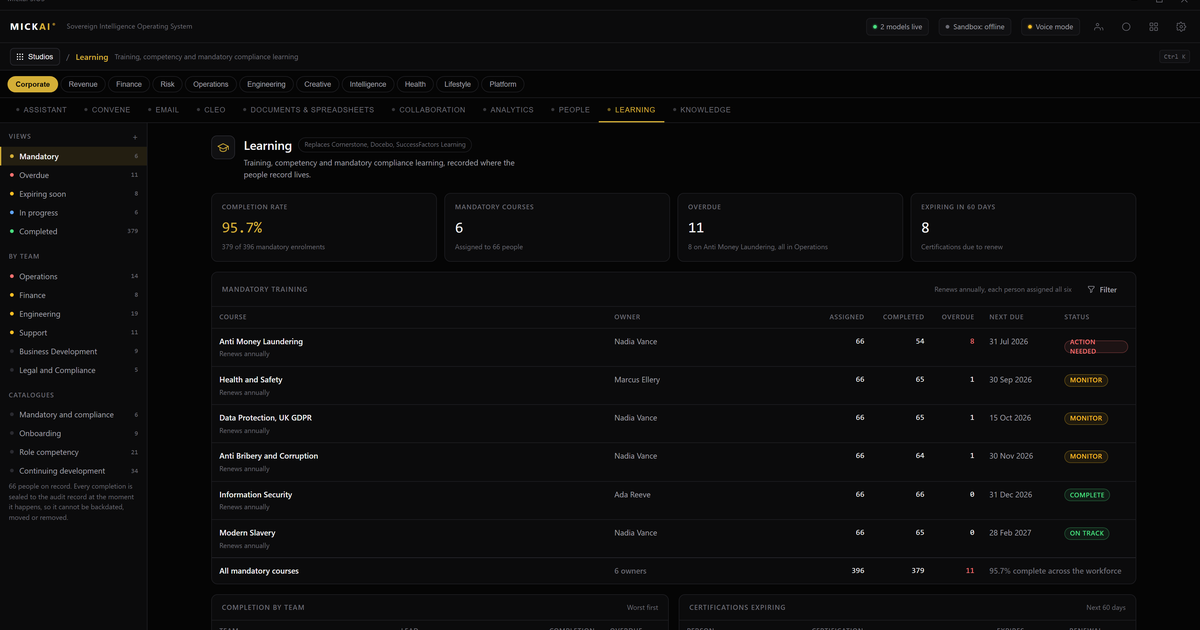
A learning and training studio you own means the courses, the materials, the quiz results and every completion record live on hardware you control, inside your building. Your team still gets a clean place to learn, still works through structured paths, still earns certificates. The difference is that the assistant builds and marks the training on your own machine, and nobody's progress data leaves your control. You are not renting learner seats from a vendor who holds your staff's records on your behalf.
This is our learning and training studio on the MICKAI sovereign operating system. It is not a separate app you bolt on. It is one studio among the platform's 87, sharing the same HR records, the same document library and the same assistant as the rest of your operation. Below is what it does, and what it saves.
What the training studio does
The studio runs a full learning management system. You build courses from lessons, videos, documents and quizzes, arrange them into paths, assign those paths to people or teams, and track who has done what. Onboarding, compliance refreshers, product training, health and safety, role-specific skills: all of it sits in one place your team logs into.
Each learner sees the courses assigned to them, works through at their own pace, and picks up where they left off. Progress bars, due dates, reminders, pass marks and certificates work the way people expect. A manager opens a dashboard and sees completion across the team without chasing anyone or exporting a report.
The materials live here too. Every policy document, every training video, every slide deck and reference sheet sits on a shelf the studio draws from. That library is yours. It is not uploaded to a vendor's platform to be hosted, and it is not readable by anyone outside the building.
The assistant that builds and marks
One assistant runs across every studio on the operating system, and in training it does the two jobs that make an LMS expensive to run: building the content and marking the work.
It builds. Point the assistant at a policy, a manual, a recorded session or a set of notes and it drafts a course from them. Lessons, summaries, quiz questions with answers, and a sensible completion path. A forty-page procedure becomes a structured module with a knowledge check at the end. You review the draft, correct it and approve it before a single member of staff sees it. Turning source material into a working course stops being a week of someone's time.
It marks. The assistant grades quizzes automatically and reviews written answers against a rubric you set, records the score against the right person, and flags borderline or unusual answers for a human to check rather than passing or failing them silently. A compliance quiz sat by 200 people is scored and logged without a trainer working through a spreadsheet.
It keeps things current. When a policy changes, the assistant can redraft the affected lesson and quiz so the course matches the new document, and prompt you to re-enrol the people it applies to.
All of this happens on your hardware. The model that writes the course and marks the answers does not ship your material or your staff's responses to an external service. And because it runs on the sovereign operating system, every action the assistant takes is recorded in the Open Audit Record: what it read, what it drafted, what it scored, what you approved. If an auditor asks how you know a member of staff completed mandatory training, you have the record at the action level, not just a login log.
Training that stays wired to HR
Training only earns its keep when it connects to the rest of the company, and the reason it does here is that it is not a separate system. It sits on the same operating system as your HR studio, sharing one set of company records underneath.
So a new starter added in HR is enrolled on the right onboarding path automatically, on their first day, without anyone setting it up by hand. A change of role updates the training a person is due. A completed compliance course writes straight back to the personnel record, so the person's file shows what they have done and when it expires. A qualification about to lapse surfaces in a manager's view before it becomes a problem.
There is no integration to buy and maintain between an HR platform from one vendor and an LMS from another, because it is one system reading one set of records. The training studio and the HR studio are not two products talking over a connector. They are two views onto the same company.
Staff records that stay in the building
Training data is more sensitive than it looks. Who failed a compliance test, who needed three attempts, who has not completed mandatory safety training, who is being performance-managed through a development plan. On a hosted LMS, all of that sits on a vendor's infrastructure, processed under their terms, readable in principle by their systems and their staff.
Private deployment where the vendor cannot see your data is the baseline we start from. Our training studio goes past it. It is air-gapped by default, so nothing leaves unless you decide it should. The course content, the results and the personnel links never need to leave the premises to be useful, because the assistant that builds and marks runs beside them.
For a regulated small or mid-sized firm, this is the difference between hoping a data processing agreement holds and being able to point at hardware in a room and say the training record is here. The heavyweight vendors build for the large enterprise. We build the whole stack for the regulated firm they leave behind.
The cost of renting a learning platform
Hosted learning platforms charge per learner, or per active user, per month. That is the model, and it never stops.
Published list prices vary by product and tier, and you should check the current figure for whichever platform you are comparing, but per-user pricing commonly sits in the range of 2 to 12 pounds per user per month on the mid tiers, with per-active-user and enterprise plans structured differently again. Take a conservative worked example. A workforce of 150 users at a published mid-tier price of 5 pounds per user per month is:
150 users times 5 pounds times 12 months, which is 9,000 pounds a year. Every year, rising with each person you add and each tier you are pushed up. Over five years, at a flat rate and before any increases, that is 45,000 pounds for the right to log in.
That figure buys seats, not an asset. Stop paying and the platform, the courses you built and the completion history go with it. The assumption here is a single mid-tier per-user price held flat; your real number depends on your headcount, your pricing model, whether you are billed per registered or per active user, and the add-ons the vendor charges for on top, such as authoring tools, reporting or content libraries as separate lines.
We do not publish our pricing, and this is not a like-for-like price fight. The point is the shape of the deal. You own the studio and it runs on hardware you own, rather than paying a monthly fee per person for the privilege of using someone else's software and storing your staff's training records on their servers.
One operating system, not another app
The reason the training studio is worth more than a standalone LMS is that it is not standalone. It sits on the sovereign operating system alongside the studios for HR, documents, email, meetings and the rest, 63 studios in total, with one assistant across all of them and one shared set of company data underneath.
So a course can be built from a document already in your library. A completion can update a personnel record and raise a task in a manager's queue. A pattern of failed assessments on one topic can surface in a management view without anyone exporting a spreadsheet. There is no integration layer to buy and maintain between separate vendors, because it is one system. Clients onboard onto a focused set of studios first and grow into the rest.
You are not integrating a model into your business. You are running your business on software you own, on hardware you own, with a record of every action it takes.
Frequently asked questions
Where do our courses and staff progress live? On hardware you own. Course content, quiz results, completion records and certificates sit inside your building. Nothing is copied to a vendor's cloud to be stored or scored.
Can the assistant build a course for us? Yes, locally. Point it at a policy, a manual or a recorded session and it drafts lessons, quizzes and a completion path. You review and approve before anything goes to staff.
Does it mark the assessments? Yes. The assistant grades quizzes and reviews written answers on your own machine, records the score against the person and flags anything it is unsure of for a human to check.
How is this connected to HR? Training sits on the same operating system as your HR studio, so a new starter is enrolled on the right path automatically and completion updates the personnel record without an export.
How does this compare to a hosted LMS subscription? Hosted platforms charge per learner or per active user per month, every month. Published seat prices commonly sit in the low single-digit to low double-digit pounds per user. You own the studio instead of renting seats.
Is it just the LMS, or the whole stack? The whole stack. Training is one of 63 studios on one sovereign operating system, sharing your HR, document and assistant layers. Clients start on a focused set and grow into the rest.
Frequently asked questions
Where do our courses and staff progress live?
On hardware you own. Course content, quiz results, completion records and certificates sit inside your building. Nothing is copied to a vendor's cloud to be stored or scored.
Can the assistant build a course for us?
Yes, locally. Point it at a policy, a manual or a recorded session and it drafts lessons, quizzes and a completion path. You review and approve before anything goes to staff.
Does it mark the assessments?
Yes. The assistant grades quizzes and reviews written answers on your own machine, records the score against the person and flags anything it is unsure of for a human to check.
How is this connected to HR?
Training sits on the same operating system as your HR studio, so a new starter is enrolled on the right path automatically and completion updates the personnel record without an export.
How does this compare to a hosted LMS subscription?
Hosted platforms charge per learner or per active user per month, every month. Published seat prices commonly sit in the low single-digit to low double-digit pounds per user. You own the studio instead of renting seats.
Is it just the LMS, or the whole stack?
The whole stack. Training is one of 63 studios on one sovereign operating system, sharing your HR, document and assistant layers. Clients start on a focused set and grow into the rest.