A CRM that never leaves your building
Our CRM holds customer records, pipeline and history on your own hardware, not a vendor cloud. See how it compares to Salesforce and HubSpot.
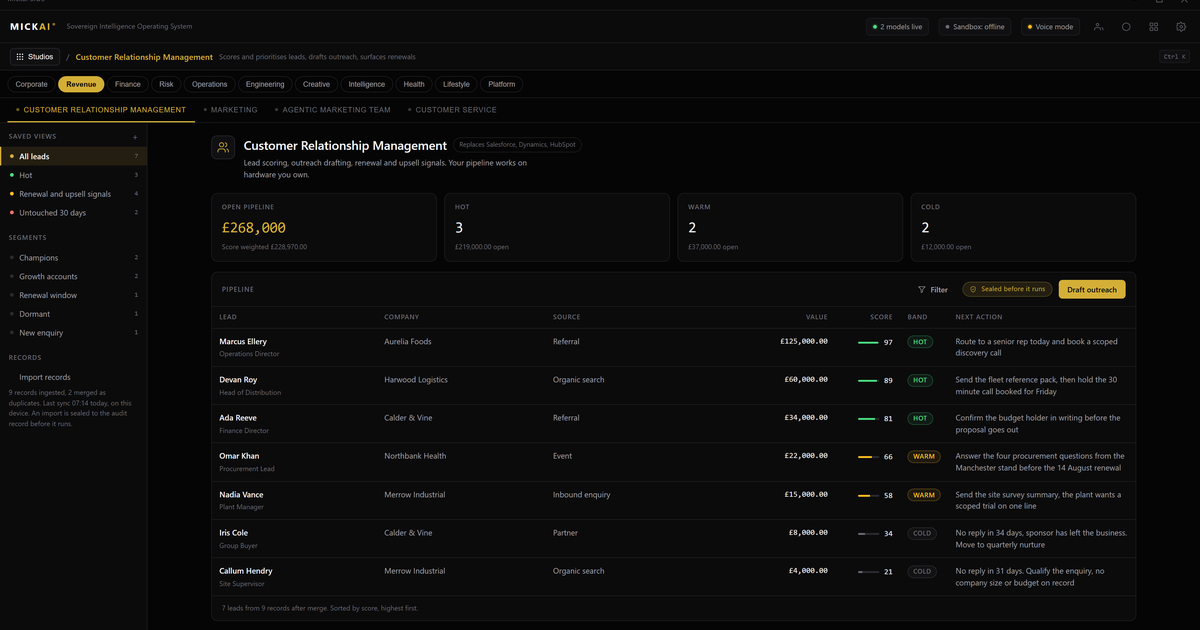
A CRM that never leaves your building is a customer system where the records, the pipeline and the full contact history live on hardware your company owns, not in a vendor's cloud. Our CRM is a studio on the MICKAI sovereign operating system: the customer list sits in your building or your private rack, no third party holds a copy, and the same assistant that runs your email and your meetings works the pipeline with you. You rent nothing and you export nothing to a place you cannot see.
What the CRM actually does
It does the work you expect a CRM to do. It holds companies and contacts, tracks deals through named pipeline stages, logs every call, email and meeting against the right record, sets tasks and reminders, and reports on what is won, lost and stuck. Sales, account management and support all work from the same record, so nobody is guessing which version of a customer is current.
The difference is where all of that lives. In a typical cloud CRM your customer list, your pricing, your notes on every prospect and your win and loss reasons sit on a vendor's servers under their control. With our CRM the entire store is on your own machine. When a salesperson opens an account, the data is read from local hardware. When they log a call, it is written to local hardware. Nothing crosses your boundary to make the product work.
That is the baseline we start from: a deployment where the vendor cannot see your data. Private cloud arrangements can get you part of the way. We go further. The CRM is air-gapped by default, so it functions with no connection to the outside, and every action is written to an audit record you hold. Your customer relationships are one of the most valuable things your firm owns. Keeping them on hardware you control is the plain, correct default.
One operating system, not a stack of separate apps
Most companies do not buy a CRM in isolation. They buy a CRM, then an email platform, then a meetings tool, then a set of connectors to make the three talk to each other. Each connector is another vendor, another subscription and another place your customer data is copied to.
Our CRM is not a separate app. It is a studio on one operating system, sharing one data store with our email system, our meetings and collaboration platform, and the assistant. Because they sit on the same foundation, a customer record already knows about the email thread and the meeting. There is no sync job, no integration to license and no window where the two systems disagree.
This is what we mean by taking the whole software stack rather than a model to integrate. You are not wiring a CRM into a landscape of other clouds. The CRM, the mailbox and the meeting room are studios on the same system, running on your hardware, reading and writing the same records.
How the CRM shares data with email, meetings and the assistant
Here is the practical picture. A prospect replies to a quote by email. Because our email system is a studio on the same operating system, that reply is already attached to the prospect's CRM record. Nobody copies it across. When you open the account you see the full thread in place.
You book a call using our meetings and collaboration platform. The meeting, its notes and any action points land against the same record. After the call the assistant can draft the follow-up, update the deal stage and set the next task, because it can read across the CRM, the mailbox and the meeting notes at once. It is one assistant across every studio, working from your data on your hardware, not a chatbot bolted onto a single app.
Ask the assistant "what is happening with this account" and it answers from the record, the emails and the meetings together. Ask it "which deals have gone quiet" and it reads the pipeline and the last contact date and tells you. The value is not a clever model in someone else's cloud. It is a capable assistant that can see the whole picture precisely because the whole picture is in one place that you own.
What it costs to rent the alternative
We do not publish MICKAI pricing. What we can do is show you the recurring bill the incumbents publish, so you can model your own number honestly.
Cloud CRM is sold per user per month, billed every year, forever. Salesforce and HubSpot both publish tiered per seat pricing on their websites; the exact figure depends on the edition you pick and moves over time, so use the current list price for the tier you would actually buy. The method matters more than any single number, so here is the method.
Take your seat count. Multiply by the vendor's published price per user per month. Multiply by twelve. That is one year. A worked example with round assumptions: a 40 person sales and service team, on a published mid tier list price of 100 pounds per user per month, is 40 times 100 times 12, which is 48,000 pounds a year. On a 150 pound per user per month tier the same team is 90,000 pounds a year. Those are illustrative figures built on a stated assumption, not a quote; put in the real seat count and the real published price for the edition you want and you have your own figure.
Now hold that recurring number against the shape of what we offer: the software running on hardware your company owns, as one of many studios on a single operating system rather than a standalone subscription you rent in perpetuity. Add the connectors and the extra clouds you would otherwise buy to link a standalone CRM to your email and meetings, and the rented stack grows again. We are not going to print our price here. We are saying: measure the subscription you would pay year after year, and measure it against owning the tools instead.
Built for the regulated small and mid-sized firm
The heavyweight vendors are built for very large buyers. The regulated small and mid-sized firm, the practice, the broker, the clinic, the manufacturer with a compliance duty, often gets the same multi-tenant cloud with none of the leverage and all of the exposure. If a regulator or a client asks where the customer data sits and who can see it, "a vendor cloud in a region we do not control" is an awkward answer.
Our CRM gives that firm a straight answer. The data is here, on our hardware, in our building. Access is logged at the action level in the Open Audit Record, so we can show who viewed, edited or exported a record. It runs air-gapped, so an outside connection is not a condition of getting to your own pipeline. To be clear about what we do not claim: we hold no SOC 2, ISO or Cyber Essentials certification. What we give you is architectural control and a full action level audit trail on kit you own, which is what most of these questions are really about.
The wider platform
The CRM is one studio. The operating system spans 63 studios on the same foundation, and clients onboard onto a focused initial set rather than switching everything at once. The point is not the count. The point is that the CRM, the email, the meetings, the team management and the assistant are the same system, sharing your data, running on your hardware. You own the customer relationships, and you own the software that manages them.
Frequently asked questions
Where does our CRM store customer data? On hardware your company owns and controls. Records, pipeline and history sit inside your building or your private rack, not in a vendor's multi-tenant cloud. Nobody outside your firm holds a copy.
How does it compare on price to Salesforce and HubSpot? Those vendors publish a per user per month subscription that recurs forever. We do not publish MICKAI pricing, but the honest comparison is a recurring rental bill against owning the software on your own kit. Use the vendor's own list price to model your annual spend.
Can the CRM see our emails and meetings? Yes, because email, meetings and the CRM are studios on one operating system sharing one data store. A record shows the full thread and the meeting notes without an integration or a connector.
Does it work when the internet is down? Yes. The CRM is air-gapped by default and runs on local hardware, so pipeline and records stay available with no connection to the outside.
Is this a finished product or an early build? It is a working studio, one of 63 studios on the operating system. Clients onboard onto a focused initial set of studios rather than all of them at once.
What stops staff from quietly exporting the customer list? Every action is written to the Open Audit Record, so exports, edits and views are logged at the action level on your own hardware for you to review.
Frequently asked questions
Where does our CRM store customer data?
On hardware your company owns and controls. Records, pipeline and history sit inside your building or your private rack, not in a vendor's multi-tenant cloud. Nobody outside your firm holds a copy.
How does it compare on price to Salesforce and HubSpot?
Those vendors publish a per user per month subscription that recurs forever. We do not publish MICKAI pricing, but the honest comparison is a recurring rental bill against owning the software on your own kit. Use the vendor's own list price to model your annual spend.
Can the CRM see our emails and meetings?
Yes, because email, meetings and the CRM are studios on one operating system sharing one data store. A record shows the full thread and the meeting notes without an integration or a connector.
Does it work when the internet is down?
Yes. The CRM is air-gapped by default and runs on local hardware, so pipeline and records stay available with no connection to the outside.
Is this a finished product or an early build?
It is a working studio, one of 63 studios on the operating system. Clients onboard onto a focused initial set of studios rather than all of them at once.
What stops staff from quietly exporting the customer list?
Every action is written to the Open Audit Record, so exports, edits and views are logged at the action level on your own hardware for you to review.